

03 - Play with ELF symbols
In this tutorial, we will see how to modify dynamic symbols in both an executable and a library.
When a library is dynamically linked to an executable, the required libraries are referenced in the DT_NEEDED entries within the dynamic table (PT_DYNAMIC).
Additionally, functions imported from this library are referenced in the dynamic symbols table with the following attributes:
Similarly, when a library exports functions, they are registered in the dynamic symbols table with the following attributes:
Imported and exported functions are abstracted in LIEF, and you can iterate over these elements using the following properties: exported_functions and imported_functions
binary: lief.Binary
library: lief.Binary

print(binary.imported_functions)
print(library.exported_functions)
When analyzing a binary, imported functions can reveal information about its underlying functionality. To avoid revealing these symbols, one solution could be to statically link the library with the executable. Another solution is to confuse the reverse engineer by swapping these symbols, which is the purpose of this tutorial.
Consider the following code:
#include <stdio.h>
#include <stdlib.h>
#include <math.h>

double hashme(double input) {
  return pow(input, 4) + log(input + 3);
}

int main(int argc, char** argv) {
  if (argc != 2) {
    printf("Usage: %s N\n", argv[0]);
    return EXIT_FAILURE;
  }

  double N = (double)atoi(argv[1]);
  double hash = hashme(N);
  printf("%f\n", hash);

  return EXIT_SUCCESS;
}
Basically, this program takes an integer as a parameter and performs a computation on this value.
$ hashme 123
228886645.836282
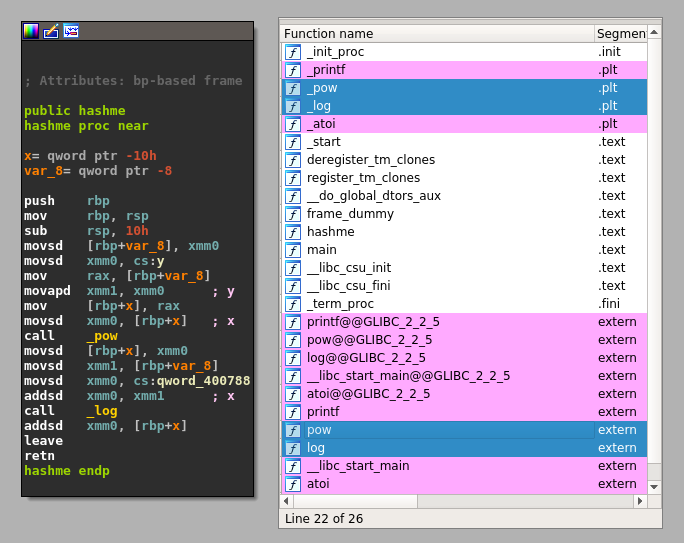
The pow and log functions are located in the libm.so.6 library. Using LIEF, we can swap these function names with other function names. For example, let’s swap pow and log with cos and sin:
First, we must load both the library and the executable:
import lief

hashme = lief.parse("hashme")
libm = lief.parse("/usr/lib/libm.so.6")
# Note: the path to libm.so.6 might be different on your system.
Then, we can change the names of the two imported functions in the executable:
hashme: lief.ELF.Binary

hashme_pow_sym = next(i for i in hashme.imported_symbols if i.name == "pow")
hashme_log_sym = next(i for i in hashme.imported_symbols if i.name == "log")

hashme_pow_sym.name = "cos"
hashme_log_sym.name = "sin"
And we must do the same in the library: the log symbol name is swapped with sin, and pow with cos:
def swap(obj, a, b):
    symbol_a = next(i for i in obj.dynamic_symbols if i.name == a)
    symbol_b = next(i for i in obj.dynamic_symbols if i.name == b)
    b_name = symbol_b.name
    symbol_b.name = symbol_a.name
    symbol_a.name = b_name

hashme: lief.ELF.Binary
libm: lief.ELF.Binary

hashme_pow_sym = next(i for i in hashme.imported_symbols if i.name == "pow")
hashme_log_sym = next(i for i in hashme.imported_symbols if i.name == "log")

hashme_pow_sym.name = "cos"
hashme_log_sym.name = "sin"

swap(libm, "log", "sin")
swap(libm, "pow", "cos")

hashme.write("hashme.obf")
libm.write("libm.so.6")
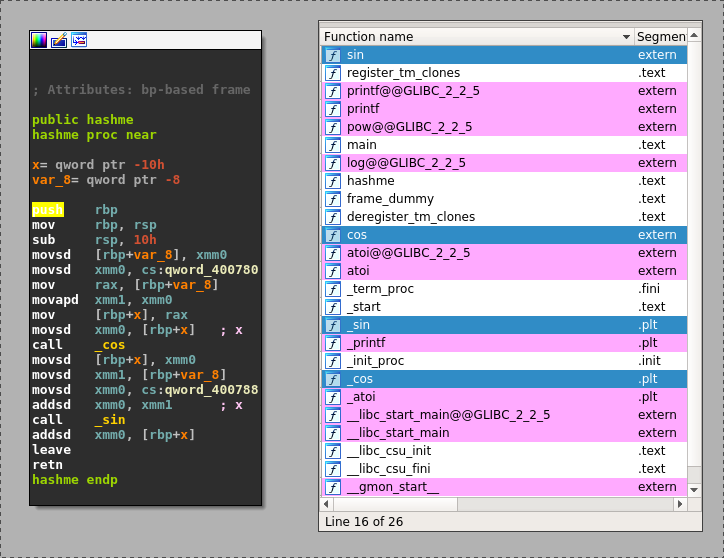
At this point, we have a modified version of libm.so in the same directory as hashme.obf. To force the loading of this modified version of libm.so, we can set the LD_LIBRARY_PATH environment variable:
$ LD_LIBRARY_PATH=. hashme.obf 123
228886645.836282
Without this environment variable, the Linux loader would resolve libm.so using the original path, and the computation would be performed using sin and cos:
$ hashme.obf 123
-0.557978
Another more realistic use case could involve swapping symbols in cryptographic libraries like OpenSSL. For example, EVP_DecryptInit and EVP_EncryptInit have the same prototype and could be swapped.