

Imports Modification
This section describes the different operations supported by LIEF to modify the PE import table. Please note that any operation not mentioned on this page should be considered unsupported or might lead to a corrupted binary.
Operation | Supported |
|---|---|
Extend original IAT | |
Extend original ILT |
Implementation Update
Compared to previous versions of LIEF, import table modification has been completely redesigned to be more reliable when modifying or rebuilding a PE binary.
Introduction
Modifying the PE import table generically and reliably can be challenging due to its flexible layout and strong dependency on the assembly code. To better understand these challenges and how LIEF addresses them, let’s start with the layout of the import table generated by the MSVC linker ( Import Table Layout (link.exe):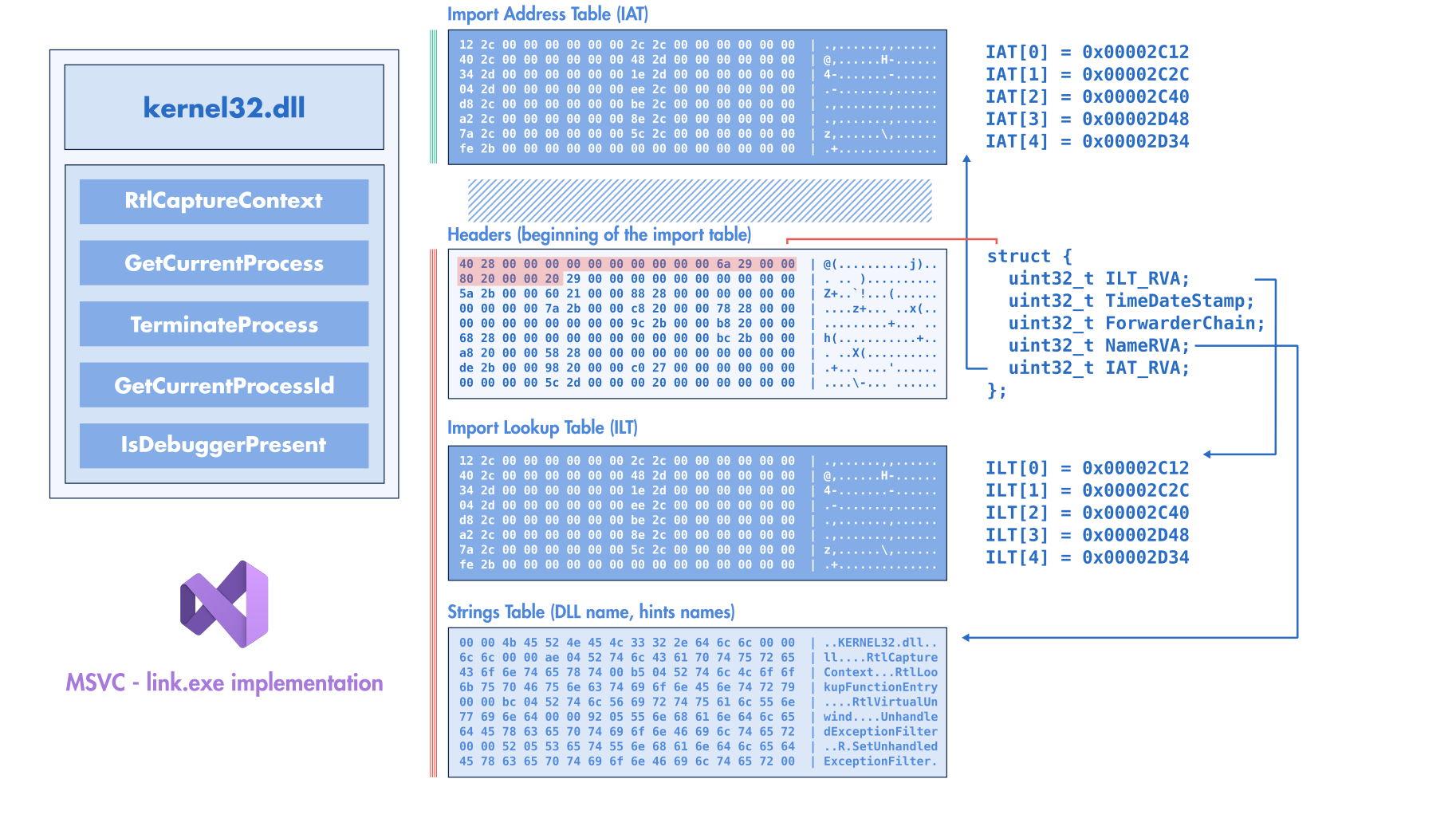
MSVC/link.exe)
IMPORT_TABLE value. The RVA of this data directory points to the beginning of the raw structure describing the import table, while the size of the data directory provides the length of this table. For each imported library (e.g., kernel32.dll), the import header references three locations:Address (RVA) of the import lookup table (ILT)
RVA of the imported library name (e.g., RVA of the string
kernel32.dll)Address (RVA) of the import address table (IAT)
The IAT and the ILT point to an array of integers (pointer width) ending with a zero. In the on-disk PE binary, both tables are filled with an RVA referencing the imported function name (or an ordinal value).
For example, if the binary imports kernel32.dll!GetCurrentProcess and kernel32.dll!TerminateProcess, we would have the following ILT/IAT:
uintptr_t IAT[3] = {
   RVA("GetCurrentProcess"),
   RVA("TerminateProcess"),
   0
};

uintptr_t ILT[3] = {
   RVA("GetCurrentProcess"),
   RVA("TerminateProcess"),
   0
};
When Windows loads the binary and resolves its imports, it fills the IAT with the resolved addresses of the imported functions:
  uintptr_t IAT[3] = {
-   RVA("GetCurrentProcess"),
-   RVA("TerminateProcess"),
+   0x7ff7bfdb3f00, // GetCurrentProcess resolved address
+   0x7ff7ceab4f00, // TerminateProcess resolved address
    0
  };
On the other hand, the ILT is left unchanged when the binary is loaded (according to Microsoft documentation). While the import header references three RVAs, the PE format (and the Windows loader) does not enforce any specific ordering between them. This means the ILT can appear before the IAT or vice versa.
Figure Import Table Layout (MSVC/link.exe) shows the layout when linking a PE binary with MSVC link.exe. As shown in this figure, the IATs come first, followed by the import headers, then the ILT, and finally the strings (DLL names and imported function names).
This layout can vary depending on the linker used to generate the final PE file. In Figure Import Table Layout (LLVM/ld-link.exe), we can see that the IAT follows the ILT, which is the default order for PE binaries generated by LLVM Import Table Layout (ld-link.exe.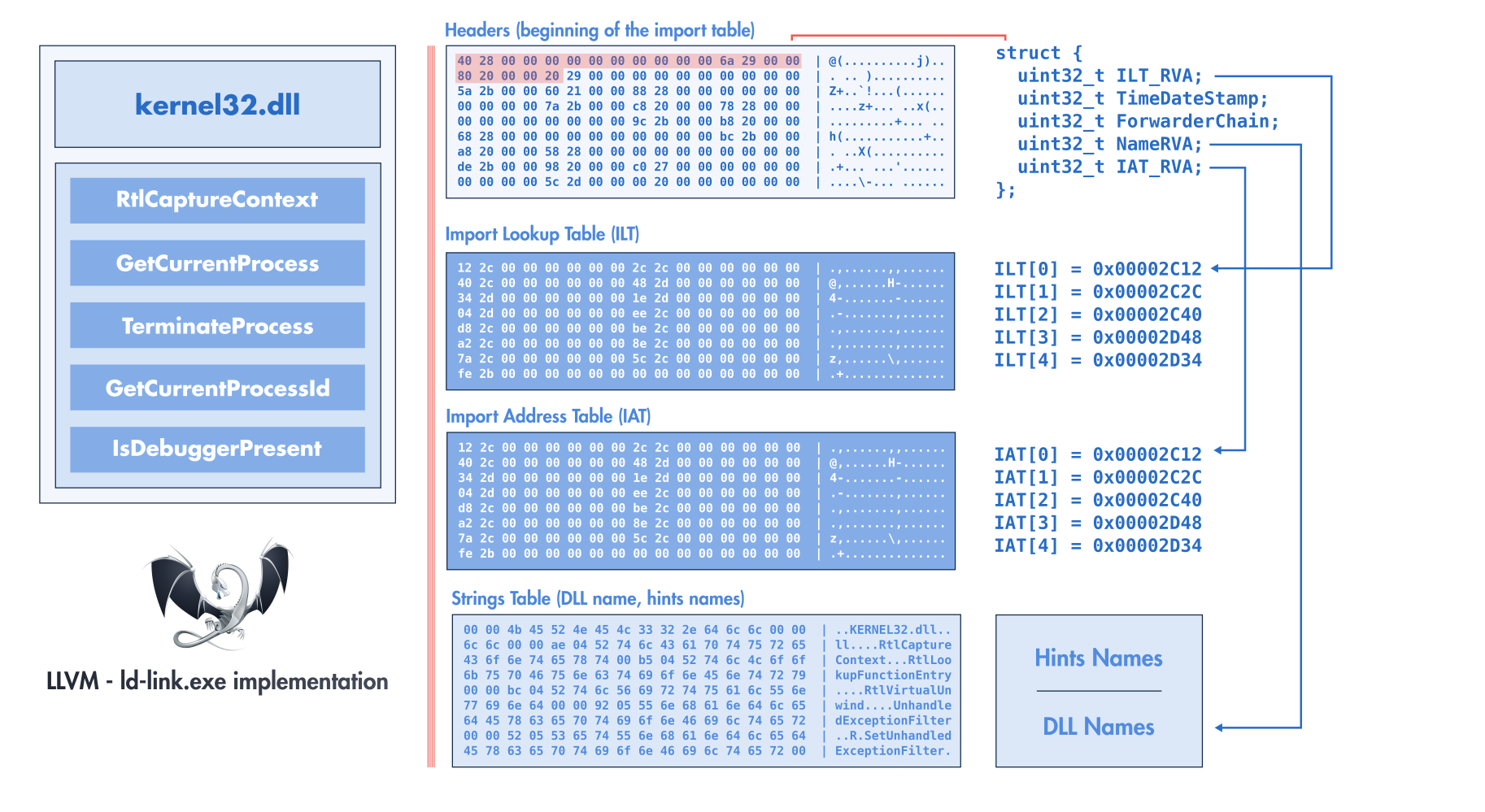
LLVM/ld-link.exe)
Since we cannot assume any predefined layout or ordering of import table elements, we cannot safely recreate a new table at the same locations as the original without risking overwriting important data. Additionally, if we add new imports or imported functions, the modified import table would no longer fit in the original location.
To address these constraints, a generic solution involves relocating the import table elsewhere within the binary.
Builder Config
We can relocate the import headers, the ILTs, and the strings (DLL names and import names), but we cannot relocate the IAT arbitrarily within the binary. The import table informs the Windows loader about the functions required by the program. When the loader resolves an imported function, its address is written to the IAT, and the assembly code accesses this IAT using stubbing instructions like these:
jmp [rip + #IAT_FIXUP]; // e.g. jmp *IAT[3];
or
mov rax, [rip + #IAT_FIXUP];
call rax;
If we relocate the IAT elsewhere in the binary without taking other factors into account, the instructions referencing the IAT become invalid.
Several solutions exist for this problem, one of which involves creating trampolines between the original IAT and the new IAT location. This approach was used in former versions of LIEF; you can read the blog post Washi’s Injecting Code using Imported Functions into Native PE Files for more details.
The new approach used by LIEF relocates most elements of the import table (headers, ILTs, and strings) but keeps the original IATs in their original locations. LIEF import table relocation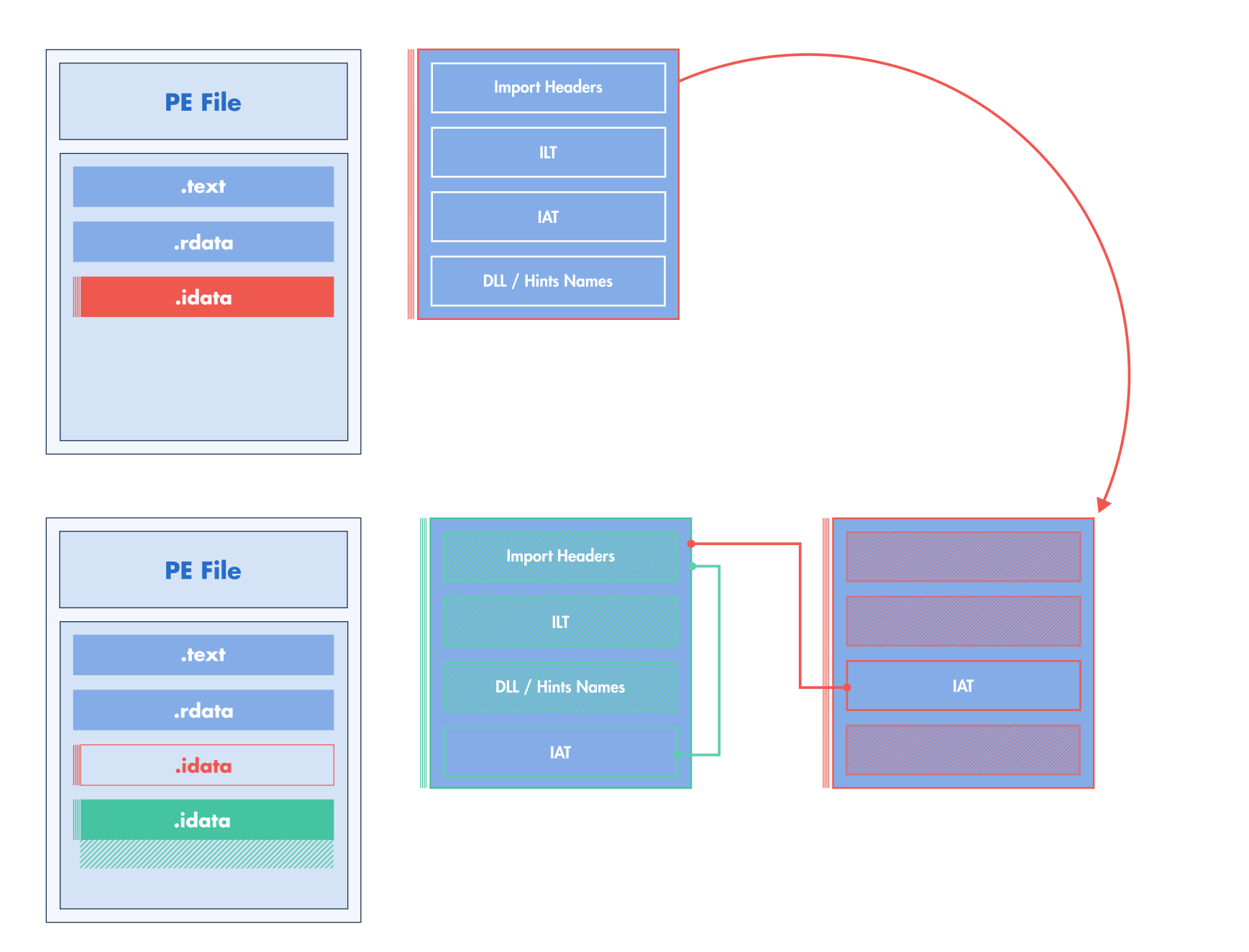
By keeping the original IATs in place, we avoid creating trampolines that require generating assembly. However, this approach introduces constraints on how imports can be modified. Specifically, we must ensure that the untouched IAT remains consistent with the assembly code that uses it.
Removing Import
pe: lief.PE.Binary

pe.remove_import("kernel32.dll")

config = lief.PE.Builder.config_t()
config.imports = True

pe.write("new.exe", config)
std::unique_ptr<LIEF::PE::Binary> pe;

pe->remove_import("kernel32.dll");

LIEF::PE::Builder::config_t config;
config.imports = true;

pe->write("new.exe", config);
let pe: &mut lief::pe::Binary = some_pe;

pe.remove_import("kernel32.dll");

let mut config = lief::pe::builder::Config::default();
config.imports = true;

pe.write_with_config("new.exe", config);
Removing an imported function
pe: lief.PE.Binary

kernel32 = pe.get_import("kernel32.dll")
assert kernel32 is not None
kernel32.remove_entry("IsDebuggerPresent")

config = lief.PE.Builder.config_t()
config.imports = True

pe.write("new.exe", config)
std::unique_ptr<LIEF::PE::Binary> pe;

LIEF::PE::Import* kernel32 = pe->get_import("kernel32.dll");
kernel32->remove_entry("IsDebuggerPresent");

LIEF::PE::Builder::config_t config;
config.imports = true;

pe->write("new.exe", config);
let pe: &mut lief::pe::Binary = some_pe;

if let Some(mut kernel32) = pe.import_by_name("kernel32.dll") {
    kernel32.remove_entry_by_name("IsDebuggerPresent");
}

let mut config = lief::pe::builder::Config::default();
config.imports = true;

pe.write_with_config("new.exe", config);
Since this operation removes an entry from the IAT, and we cannot shrink the table without patching the assembly (or using trampolines), the workaround involves replacing the removed entry with another existing entry. For example, if we remove IsDebuggerPresent from Kernel32.dll, the IAT changes as follows:
- Before:
// Import Address Table of Kernel32.dll
uintptr_t IAT[] = {
   RVA("GetCurrentProcess"),
   RVA("IsDebuggerPresent"),
   RVA("TerminateProcess"),
   0
};
- After:
// Import Address Table of Kernel32.dll
uintptr_t IAT[] = {
   RVA("GetCurrentProcess"),
   RVA("GetCurrentProcess"),
   RVA("TerminateProcess"),
   0
};
Implicit Operation
LIEF implicitly performs this padding during the build process.
This works because we can reuse the IAT entry associated with the deleted function as a placeholder for any other imported function. Windows allows duplicate symbols for a given import, so duplicating an import is perfectly valid and maintains the IAT’s original length.
Creating a new import
pe: lief.PE.Binary

stdio = pe.add_import("api-ms-win-crt-stdio-l1-1-0.dll")
stdio.add_entry("puts")

config = lief.PE.Builder.config_t()
config.imports = True

pe.write("new.exe", config)
std::unique_ptr<LIEF::PE::Binary> pe;

LIEF::PE::Import& stdio = pe->add_import("api-ms-win-crt-stdio-l1-1-0.dll");
LIEF::PE::ImportEntry& _puts = stdio.add_entry("puts");

LIEF::PE::Builder::config_t config;
config.imports = true;

pe->write("new.exe", config);
let pe: &mut lief::pe::Binary = some_pe;

let mut stdio = pe.add_import("api-ms-win-crt-stdio-l1-1-0.dll");
let _puts = stdio.add_entry_by_name("puts");

let mut config = lief::pe::builder::Config::default();
config.imports = true;

pe.write_with_config("new.exe", config);
As shown in Figure LIEF import table relocation, this modification introduces a new IAT located near the relocated import table. This new IAT contains values for the newly imported functions (puts in this example). Consequently, the Windows loader will resolve the imported functions in this table.
The new IAT containing user-created imports is generated during the LIEF write operation. Notably, there is no reliable way to determine the address of the new IAT before the write operation.
pe: lief.PE.Binary

def iat_resolution_cbk(
    pe: lief.PE.Binary, imp: lief.PE.Import, entry: lief.PE.ImportEntry, rva: int
):
    # Process
    return

stdio = pe.add_import("api-ms-win-crt-stdio-l1-1-0.dll")
stdio.add_entry("puts")

config = lief.PE.Builder.config_t()
config.imports = True
config.resolved_iat_cbk = iat_resolution_cbk

pe.write("new.exe", config)
std::unique_ptr<LIEF::PE::Binary> pe;

LIEF::PE::Import& stdio = pe->add_import("api-ms-win-crt-stdio-l1-1-0.dll");
LIEF::PE::ImportEntry& _puts = stdio.add_entry("puts");

LIEF::PE::Builder::config_t config;
config.imports = true;
config.resolved_iat_cbk = [](LIEF::PE::Binary* pe, const LIEF::PE::Import* imp,
                             const LIEF::PE::ImportEntry* entry,
                             uint32_t RVA) -> void {
  // Process
  return;
};

pe->write("new.exe", config);
Rust Bindings
This callback is not yet available in Rust.
Nanobind Leaks
Due to Python’s reference counting, you might encounter Nanobind warnings about leaked objects. You can disable these warnings using lief.disable_leak_warning().
uint32_t RVA, is the address in the IAT where the address of the resolved function () will be stored by the loader.For example, these addresses can be traced as follows:
def iat_resolution_cbk(pe: lief.PE.Binary, imp: lief.PE.Import,
                       entry: lief.PE.ImportEntry, rva: int):
    print(f"{imp.name}!{entry.name}: 0x{rva:010x}")

# [...]
stdio = dll.add_import("api-ms-win-crt-stdio-l1-1-0.dll")

stdio.add_entry("puts")
stdio.add_entry("__p__commode")
stdio.add_entry("_set_fmode")

# [...]
Which can result in the following output:
api-ms-win-crt-stdio-l1-1-0.dll!puts:         0x000046c9e2
api-ms-win-crt-stdio-l1-1-0.dll!__p__commode: 0x000046c9ea
api-ms-win-crt-stdio-l1-1-0.dll!_set_fmode:   0x000046c9f2
Given this output, the IAT address of puts is at RVA 0x000046c9e2. This information can be used to patch sections that need this address:
def iat_resolution_cbk(pe: lief.PE.Binary, imp: lief.PE.Import,
                       entry: lief.PE.ImportEntry, rva: int):
  code = pe.get_section(".injected")
  patch(code, rva)
Adding a new imported function
LIEF can also be used to add a function to an existing import, but this must be done carefully to avoid corrupting the binary.
Since we cannot extend the original IAT of the import where we want to add the new function, the workaround involves adding a new import with the same name as the existing one and adding the function to this duplicate import.
// Original Import
* kernel32.dll
  │
  ├── GetCurrentProcessId    IAT[0]
  │
  ├── GetCurrentThreadId     IAT[1]
  │
  └── GetModuleHandleW       IAT[2]

// Duplicated import
* kernel32.dll
  │
  └── GetStartupInfoW        NEW IAT[0]
       │
       └────────-> New Import
The code is very similar to that in Creating a new import.
pe: lief.PE.Binary

kernel32 = pe.add_import("kernel32.dll")
kernel32.add_entry("GetStartupInfoW")

config = lief.PE.Builder.config_t()
config.imports = True

pe.write("new.exe", config)
std::unique_ptr<LIEF::PE::Binary> pe;
LIEF::PE::Import& kernel32 = pe->add_import("kernel32.dll");
LIEF::PE::ImportEntry& _GetStartupInfoW = kernel32.add_entry("GetStartupInfoW");

LIEF::PE::Builder::config_t config;
config.imports = true;

pe->write("new.exe", config);
let pe: &mut lief::pe::Binary = some_pe;

let mut kernel32 = pe.add_import("kernel32.dll");
let _get_startup_info = kernel32.add_entry_by_name("GetStartupInfoW");

let mut config = lief::pe::builder::Config::default();
config.imports = true;

pe.write_with_config("new.exe", config);