

11 - Mach-O Modification
This tutorial covers Mach-O format modification and introduces some internal aspects of the format.
Files and scripts used in this tutorial are available in the tutorials repository.
Introduction
A basic Mach-O binary (i.e., not FAT) can be represented in four parts, as described in this diagram: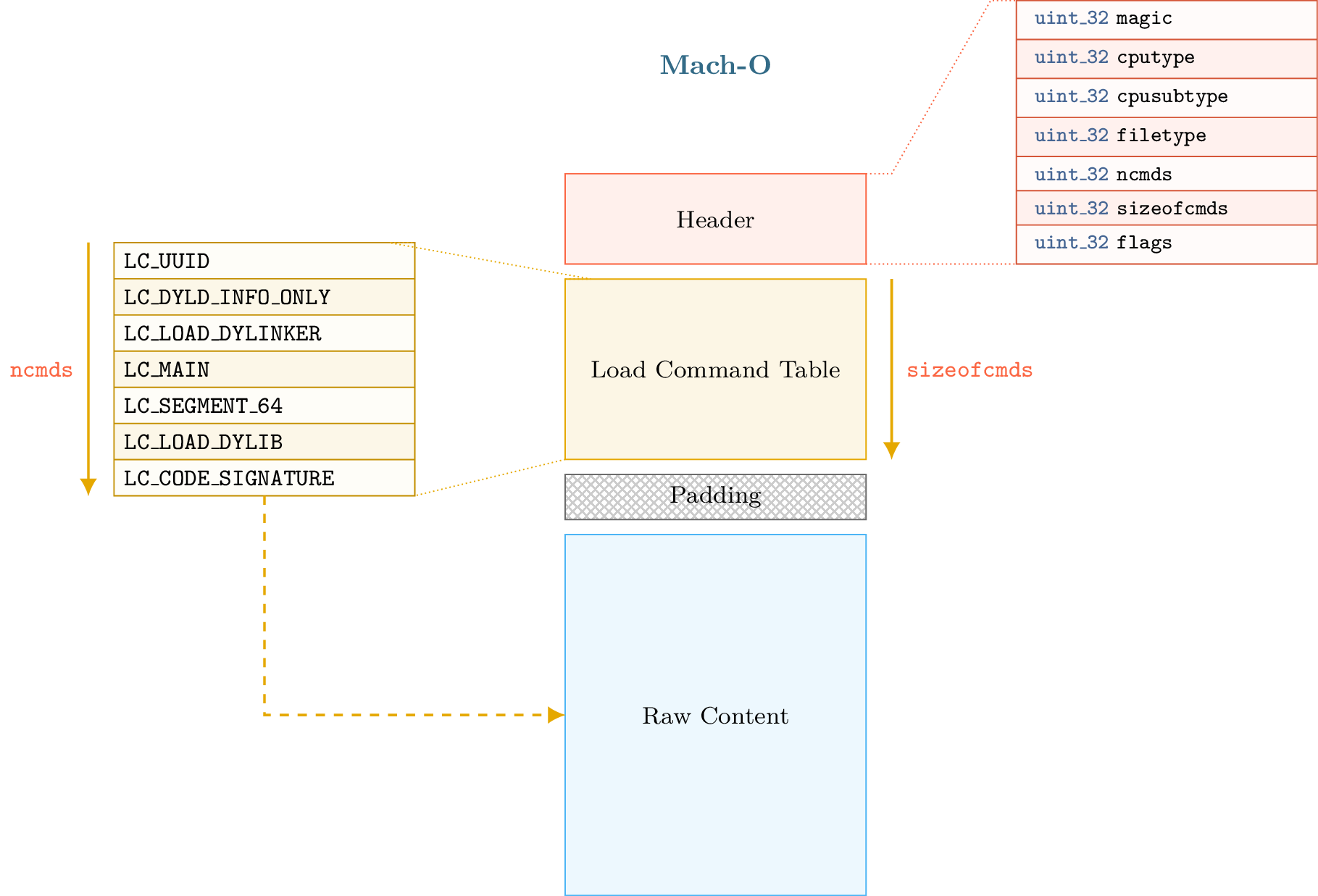
The first part begins with a header that can be accessed through the lief.MachO.Binary.header attribute. The second part contains the load commands table, which can be iterated over using lief.MachO.Binary.load_commands. This is optionally followed by padding or free space. Finally, the fourth part contains the raw data (assembly code, rebase bytecode, signatures, etc.).
Load commands such as SegmentCommand or DyldInfo can be associated with raw data located after the load command table and the padding section. The padding section is used by macOS to sign the binary after compilation by adding a custom command. The codesign utility extends the raw data area with the signature and adds an LC_CODE_SIGNATURE or LC_DYLIB_CODE_SIGN_DRS command in the padding area.
Since load commands are the base unit of the Mach-O format (segments, shared libraries, entry points, etc., are all commands), the ability to add arbitrary commands to a binary enables interesting possibilities such as code injection, anti-analysis, etc.
Different techniques exist for adding new commands to a Mach-O binary:
Replacing an existing load command that is not mandatory for execution, such as
UUIDCommandorCodeSignature.Using the padding area to expand the command header.
The main limitation of these techniques is that the size and number of commands that can be added are tied to the padding section size or the size of the command replaced.
If the padding size is small, we cannot add a LOAD_DYLIB command with a very long library path. Moreover, codesign may complain if there is insufficient space to add the LC_CODE_SIGNATURE because we are using space that was reserved for it.
The following sections discuss format modifications and how LIEF addresses these limitations.
When PIE Makes Things Easier
macOS and iOS executables are typically compiled with flags that make them position-independent. Instructions generated by the compiler use relative addressing associated with rebase information.
To simplify, PIE binaries allow the raw data section to be mapped at a random base address. LIEF leverages this by shifting the raw data section within the format.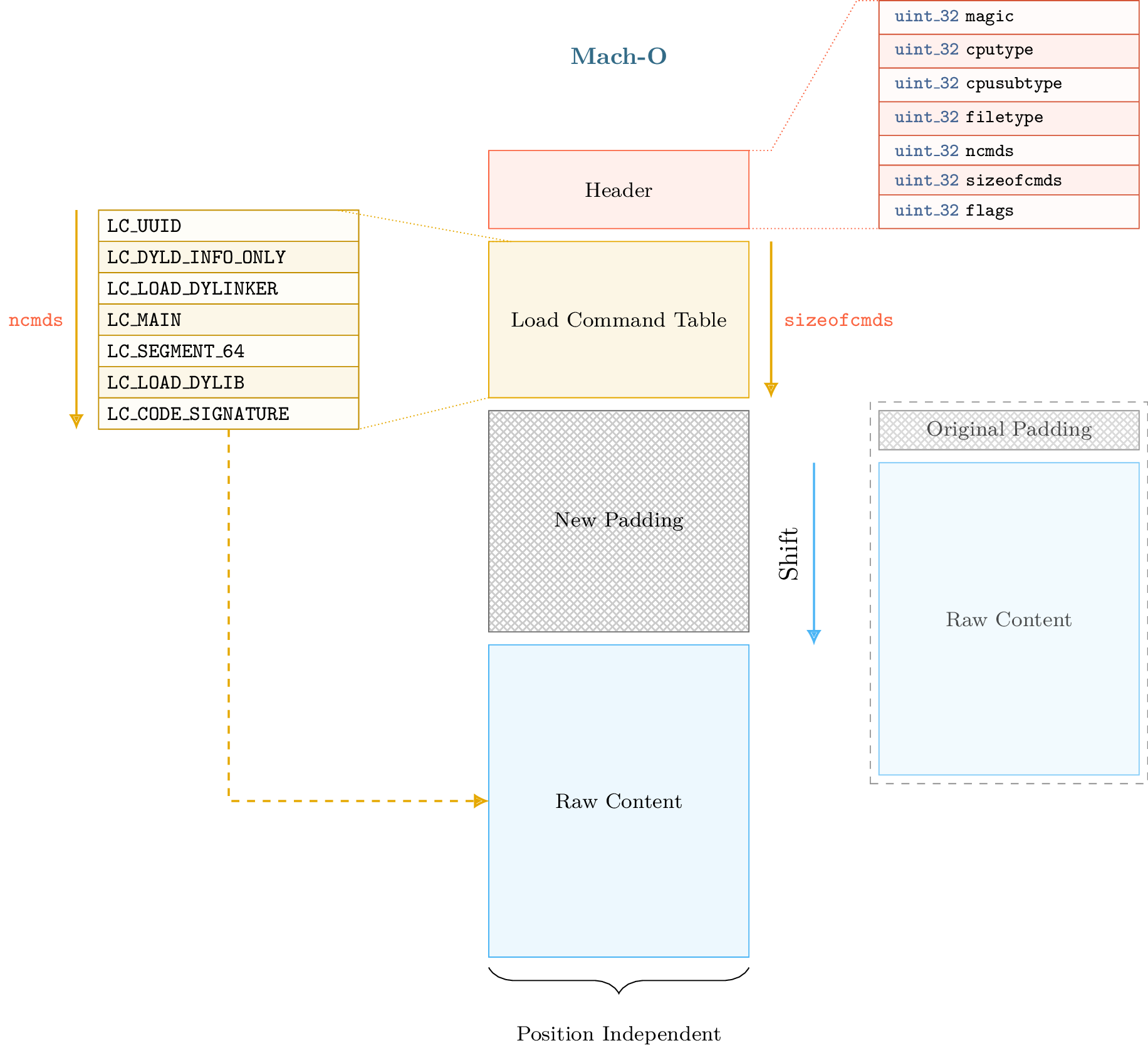
Such a transformation also requires maintaining consistent format metadata. Specifically, when we shift the raw data, we must update relocations, segment offsets, virtual addresses, etc. Once the raw data is shifted and the metadata updated, we have arbitrary space between the load command table and the raw data section. Thus, we can extend the load command table as shown in the figure below: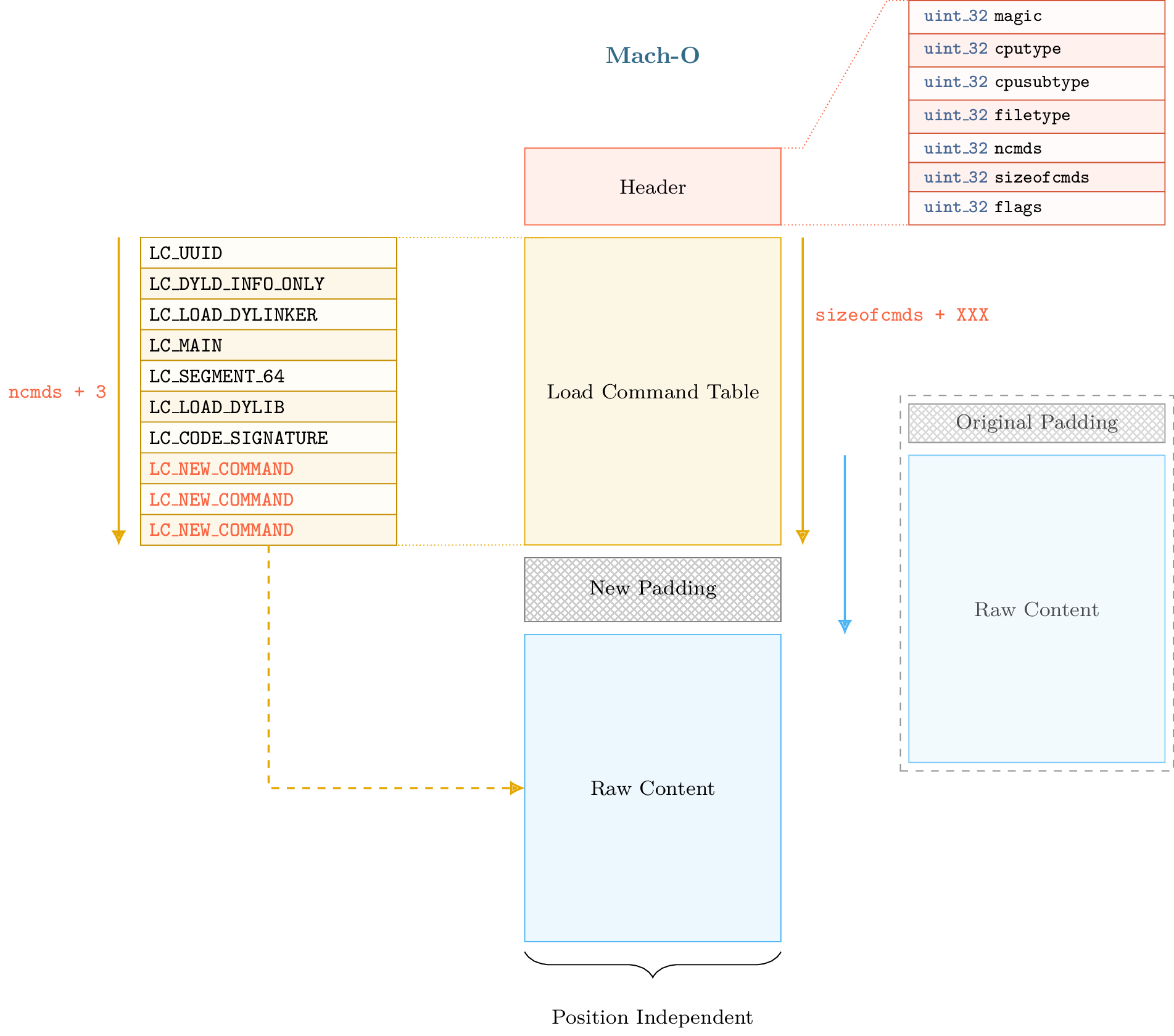
Warning
The size of the shift must be aligned with the page size to avoid issues with section and segment alignment.
Maintaining format consistency after a shift transformation is complex. The next section presents parts of the Mach-O format that must be updated to maintain consistency.
When Mach-O Makes Things Harder
After the shift operation, we must update several load commands:
lief.MachO.SymbolCommand.symbol_offset/lief.MachO.SymbolCommand.strings_offsetlief.MachO.DataInCode.data_offset,lief.MachO.CodeSignature.data_offset,lief.MachO.SegmentSplitInfo.data_offsetlief.MachO.FunctionStarts.data_offset/lief.MachO.FunctionStarts.functionslief.MachO.Section.offset/lief.MachO.Section.virtual_addresslief.MachO.SegmentCommand.offset/lief.MachO.SegmentCommand.virtual_address…
We also need to update:
Relocations
Binding information
Export information
While the ELF and PE formats use structures for internal storage of relocations and exports, the Mach-O format uses bytecode to rebase the binary. Export information is stored in a trie data structure. The use of tries and bytecode reduces binary size but makes updates more difficult, as we must interpret and regenerate the bytecode. As mentioned previously, recent Mach-O loaders use bytecode to relocate (or rebase) the binary. The offset and size of the bytecode are specified in the Warning Note that the This offset points to a list of relocation structures (not bytecode), the number of which is defined by To determine which addresses must be relocated, we must interpret the bytecode. The From the output above, we can see that the loader will rebase pointers in the For those who only care about the exact addresses being relocated, this output is not very user-friendly. LIEF also provides a representation of this bytecode by creating The Using this representation, we can update relocations by adding the shift size to the When the Mach-O builder reconstructs the final binary, it regenerates and optimizes the rebase bytecode according to the current state of the relocations. The process can be summarized by the following diagram: The Mach-O loader also uses bytecode to bind imported functions or symbols. This bytecode is used in three different binding methods: Normal binding Weak binding (used when the same symbol is defined multiple times) Lazy binding (bound only when the symbol is accessed) The bytecode can be pretty-printed with The representation and update process are identical to those described in the Rebase Bytecode section. For exported functions and symbols, the Mach-O format uses a trie structure to store export information. The trie offset and size are specified in the Once parsed, trie entries are represented via the After the shift operation, export information is patched by updating the Rebase Bytecode
lief.MachO.DyldInfo.rebase attribute. Basically, the bytecode is composed of REBASE_OPCODES that define addresses to relocate.Section object has a relocation_offset attribute. This appears to be used only for Mach-O object files (lief.MachO.Header.FILE_TYPE.OBJECT) or executables using an old version of the Mach-O loader.numberof_relocations.lief.MachO.DyldInfo.show_rebases_opcodes attribute returns the bytecode as pseudo-code:import lief
app = lief.parse("MachO64_x86-64_binary_id.bin")
print(app.dyld_info.show_rebases_opcodes)
[SET_TYPE_IMM] Type: POINTER
[SET_SEGMENT_AND_OFFSET_ULEB] Segment Index := 2 (__DATA) Segment Offset := 0x20
[DO_REBASE_ULEB_TIMES]
  for i in range(26):
      rebase(POINTER, __DATA, 0x20)
      Segment Offset += 0x8 (0x28)

      rebase(POINTER, __DATA, 0x28)
      Segment Offset += 0x8 (0x30)

      rebase(POINTER, __DATA, 0x30)
      Segment Offset += 0x8 (0x38)

      rebase(POINTER, __DATA, 0x38)
      Segment Offset += 0x8 (0x40)

      rebase(POINTER, __DATA, 0x40)
      Segment Offset += 0x8 (0x48)
      ...
[DONE]
__DATA segment at offsets 0x20, 0x28, 0x38, ....lief.MachO.Relocation objects, which are the result of interpreting the bytecode.lief.MachO.Binary.relocations attribute returns an iterator over lief.MachO.Relocation objects that model a relocation, similar to lief.ELF.Relocation and lief.PE.Relocation.app: lief.MachO.Binary
for relocation in app.relocations:
print(relocation)
100002020 POINTER 64 DYLDINFO  __DATA.__la_symbol_ptr _err
100002028 POINTER 64 DYLDINFO  __DATA.__la_symbol_ptr _errx
100002030 POINTER 64 DYLDINFO  __DATA.__la_symbol_ptr _exit
100002038 POINTER 64 DYLDINFO  __DATA.__la_symbol_ptr _fprintf
100002040 POINTER 64 DYLDINFO  __DATA.__la_symbol_ptr _free
100002048 POINTER 64 DYLDINFO  __DATA.__la_symbol_ptr _fwrite
...
lief.MachO.Relocation.address attribute.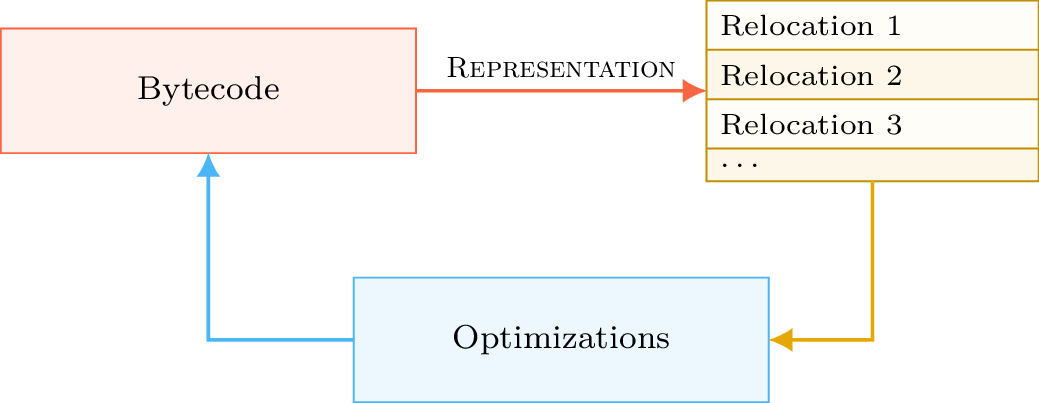
Binding Bytecode
show_bind_opcodes, show_weak_bind_opcodes, and show_lazy_bind_opcodes:app: lief.MachO.Binary
print(app.dyld_info.show_bind_opcodes)
[SET_DYLIB_ORDINAL_IMM]
    Library Ordinal := 1
[SET_SYMBOL_TRAILING_FLAGS_IMM]
    Symbol name := ___stderrp
    Is Weak ? false
[SET_TYPE_IMM]
    Type := POINTER
[SET_SEGMENT_AND_OFFSET_ULEB]
    Segment := __DATA
    Segment Offset := 0x10
[DO_BIND]
    bind(POINTER, __DATA, 0x10, ___stderrp, library_ordinal=/usr/lib/libSystem.B.dylib, addend=0, is_weak_import=false)
    Segment Offset += 0x8 (0x18)
Export Trie
export_trie attribute.ExportInfo object and can be retrieved using the export_info attribute.app = lief.parse("FAT_MachO_x86_x86-64_library_libdyld.dylib")
print(app.dyld_info.show_export_trie)
...
_@off.0x17
    _N@off.0x21
        _NS@off.0x50
            _NSI@off.0x5d
                _NSInstallLinkEditErrorHandlers@off.0x11d
                _NSInstallLinkEditErrorHandlers{addr: 0x126b, flags: 0}
...
app: lief.MachO.Binary

for s in app.symbols:
    if s.has_export_info:
        print(s.export_info)
Node Offset: 128
Flags:       0
Address:     126b
Symbol:      _NSInstallLinkEditErrorHandlers

Node Offset: 5f6
Flags:       0
Address:     2168
Symbol:      _NSIsSymbolDefinedInObjectFileImage

Node Offset: 1a0
Flags:       0
Address:     1391
Symbol:      _NSIsSymbolNameDefined
...
address attribute, and a new export trie is generated from the updated data.
Removing the Signature
Removing the LC_CODE_SIGNATURE command is a basic modification that is very useful when modifying Mach-O files. Since the signature verifies the integrity of the binary, this command typically needs to be removed after modifying the file. The binary can be re-signed once all modifications are finished.
LIEF provides the lief.MachO.Binary.remove_signature() function to remove this command:
ssh: lief.MachO.Binary

ssh.remove_signature()

ssh.write("ssh.nosigned")
Adding a Section/Segment
Since we can allocate arbitrary space between the load command table and the raw data, we can also extend an existing LoadCommand. In particular, Mach-O segments are commands associated with the LIEF object lief.MachO.SegmentCommand.
To add a new section to the __TEXT segment, we must extend the load command associated with that segment to accommodate a new section structure. We must also reserve space for the section’s content. Since the content of the __TEXT segment begins at offset 0 and ends somewhere in the raw data, the appropriate place to insert the new content is between the end of the load command table and the beginning of the raw data: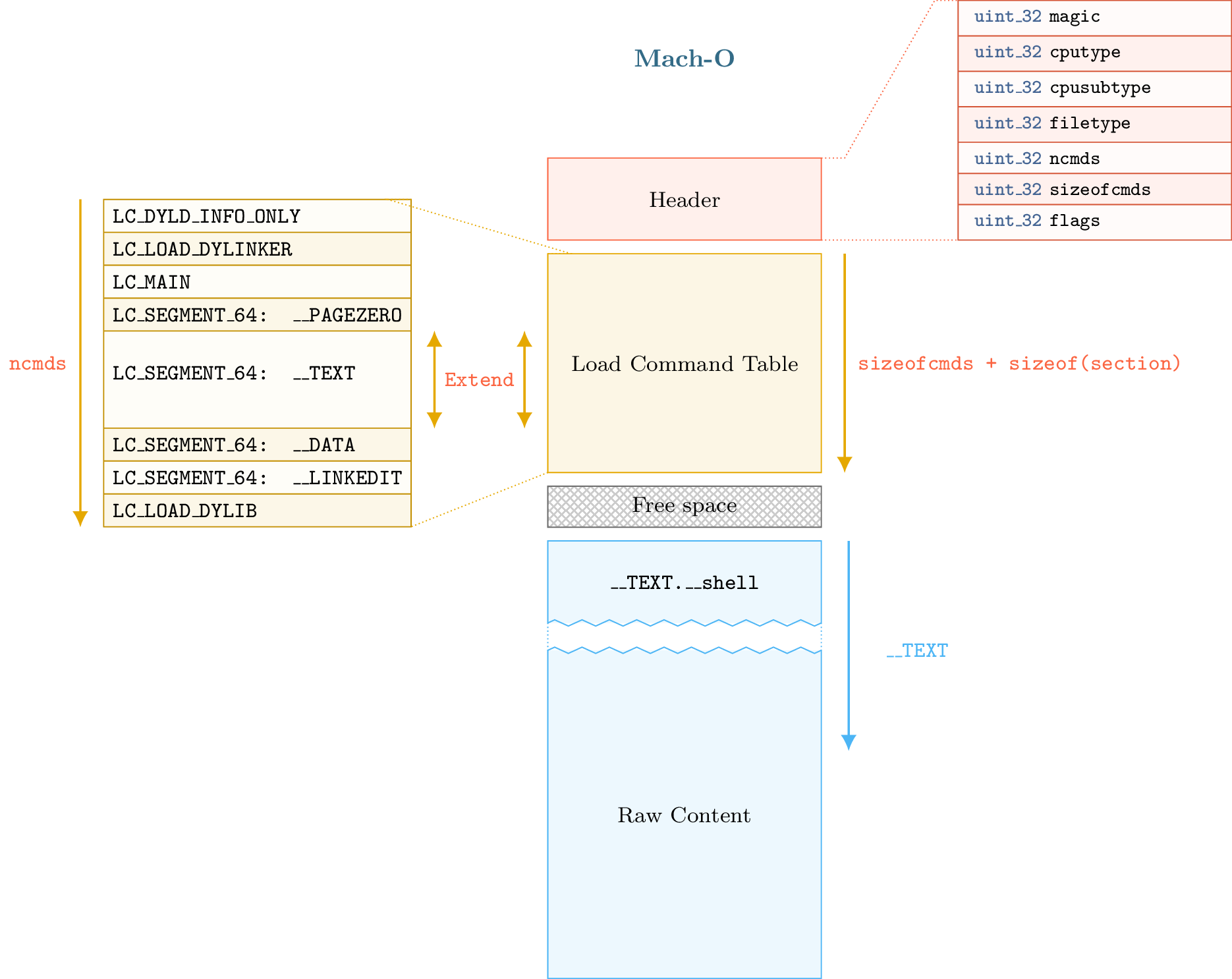
The process described above is implemented via the lief.MachO.Binary.add_section() method.
In this example, we will inject assembly code that executes /bin/sh:
app: lief.MachO.Binary
raw_shell: list[int]

section = lief.MachO.Section.create("__shell", raw_shell)
assert isinstance(section, lief.MachO.Section)

section.alignment = 2
section += lief.MachO.Section.FLAGS.SOME_INSTRUCTIONS
section += lief.MachO.Section.FLAGS.PURE_INSTRUCTIONS

section = app.add_section(section)
print(section)
We can then change the entry point by setting the lief.MachO.MainCommand.entrypoint attribute:
app: lief.MachO.Binary
section: lief.MachO.Section

__TEXT = app.get_segment("__TEXT")
assert __TEXT is not None

main = app.main_command
assert main is not None

main.entrypoint = section.virtual_address - __TEXT.virtual_address
Finally, we remove the signature and reconstruct the binary:
app: lief.MachO.Binary

app.remove_signature()
app.write("./id.modified")
The execution of id.modified should yield a similar output:
Mac-mini:tmp romain$ ./id.modified
tmp @ [romain] $
You can also check other tools such as optool [2] or insert_dylib [3].
References
API