

07 - PE Resources
This tutorial provides an overview of the resource structure in a PE file and explains how to manipulate it using LIEF.
Unlike the ELF and Mach-O formats, PE enables embedding resources (icons, images, dialogs, etc.) within an executable or a DLL.
These resources are usually located in the .rsrc section, but this is not an absolute rule.
To retrieve the section where resources are located, you can use the section attribute of the associated DataDirectory:
binary: lief.PE.Binary

if binary.has_resources:
    rsrc_directory = binary.data_directory(
        lief.PE.DataDirectory.TYPES.RESOURCE_TABLE
    )
    assert rsrc_directory is not None
    if rsrc_directory.has_section:
        print(rsrc_directory.section)
.rsrc 22e0d8 23f000 22e200 236c00 0 4.3596 CNT_INITIALIZED_DATA - MEM_READ
Resource Structure
The underlying structure used to represent resources is a tree: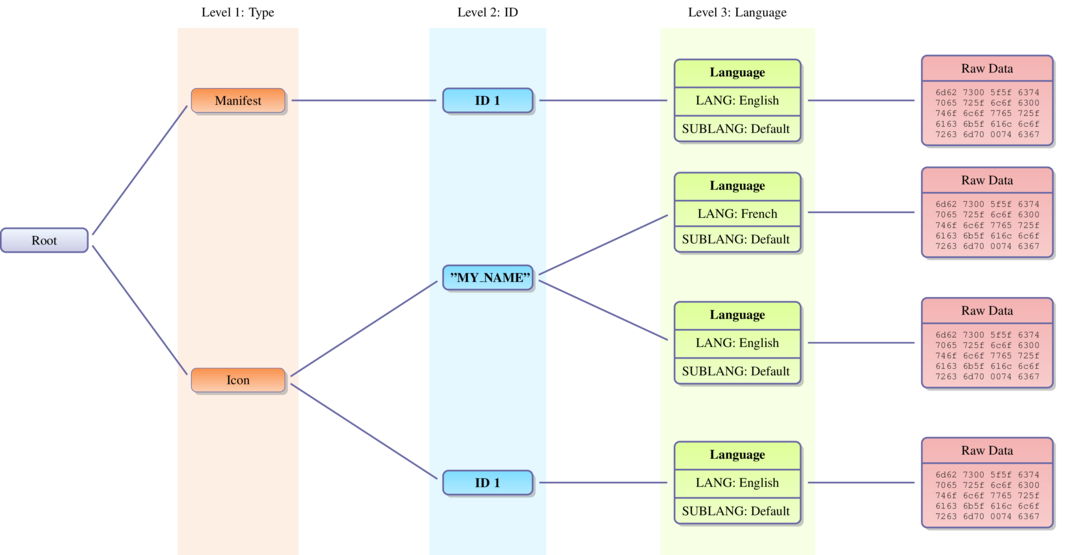
In the resource tree, there are basically two kinds of nodes:
ResourceDirectory: Contains information about the subtree.ResourceData: Used to store raw data. These nodes are the leaves of the tree.
The first three levels of the tree have a special meaning:
Level 1: The
idrepresents theTYPE.Level 2: The
idrepresents an ID for accessing the resource.Level 3: The
idrepresents theRESOURCE_LANGS/ SUBLANG of the resource.
You can check if a given binary embeds resources using the has_resources property. You can then access this structure through the resources property, which returns a ResourceDirectory representing the root of the tree.
Given a ResourceDirectory, the childs property returns an iterator (similar to a list) over the subtree associated with the node.
The following snippet retrieves the MANIFEST element and prints it:
filezilla: lief.PE.Binary

root = filezilla.resources
assert root is not None

# First level => Type (ResourceDirectory node)
manifest_node = next(
    i for i in root.childs if i.id == lief.PE.ResourcesManager.TYPE.MANIFEST
)
print(manifest_node)

# Second level => ID (ResourceDirectory node)
id_node = manifest_node.childs[0]
print(id_node)

# Third level => Lang (ResourceData node)
lang_node = id_node.childs[0]
print(lang_node)

manifest = bytes(lang_node.content).decode("utf8")

print(manifest)
[DIRECTORY] - ID: 0x18 - Depth: 1 - Childs : 1
    Characteristics :         0
    Time/Date stamp :         0
    Major version :           0
    Minor version :           0
    Number of name entries :  0
    Number of id entries :    1

[DIRECTORY] - ID: 0x01 - Depth: 2 - Childs : 1
    Characteristics :         0
    Time/Date stamp :         0
    Major version :           0
    Minor version :           0
    Number of name entries :  0
    Number of id entries :    1

[DATA] - ID: 0x409 - Depth: 3 - Childs : 0
    Code page :  0
    Reserved :   0
    Size :       1666
    Hash :       ffffffffb00b5419

<?xml version="1.0" encoding="UTF-8" standalone="yes"?>
<assembly xmlns="urn:schemas-microsoft-com:asm.v1" manifestVersion="1.0" xmlns:asmv3="urn:schemas-microsoft-com:asm.v3">
  <assemblyIdentity
    name="FileZilla"
...
Since manipulating a tree directly can be inconvenient, LIEF exposes a ResourcesManager, which provides an enhanced API for manipulating binary resources.
Resource Manager
As mentioned previously, the ResourcesManager acts as a wrapper around the resource tree to:
Parse resources with predefined structures, such as
MANIFEST,ICON,VERSION, etc.Access and modify these structures.
This can be summarized with the following diagram: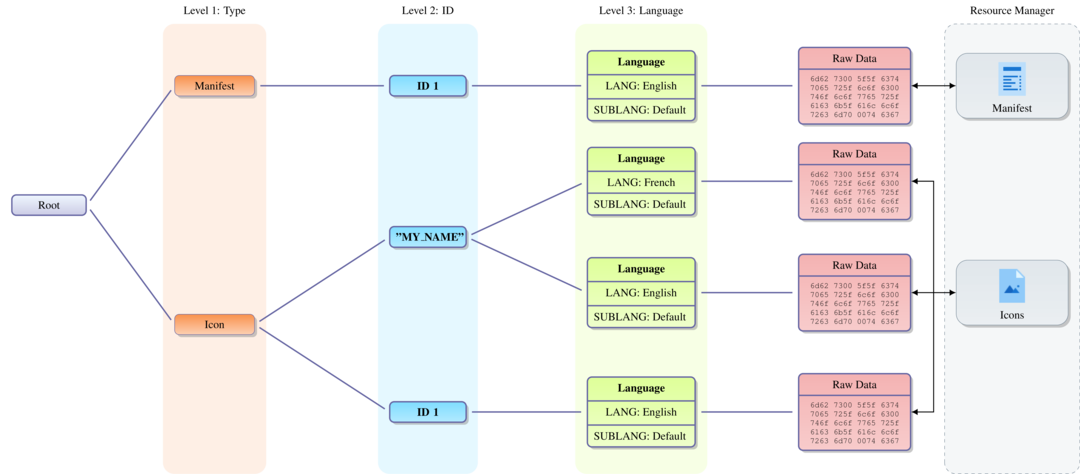
The ResourcesManager can be accessed via the resources_manager property. To get an overview of the binary’s resources, you can simply print the ResourcesManager instance:
filezilla: lief.PE.Binar

resource_manager = filezilla.resources_manager
print(resource_manager)
  [Directory] ID: 01 - CURSOR
    [Directory] ID: 01
      [Data] ID: 1033 - ENGLISH/DEFAULT
    [Directory] ID: 02
      [Data] ID: 1033 - ENGLISH/DEFAULT
    [Directory] ID: 03
      [Data] ID: 1033 - ENGLISH/DEFAULT
    [Directory] ID: 04
      [Data] ID: 1033 - ENGLISH/DEFAULT
    [Directory] ID: 05
      [Data] ID: 1033 - ENGLISH/DEFAULT
    [Directory] ID: 06
      [Data] ID: 1033 - ENGLISH/DEFAULT
    [Directory] ID: 07
      [Data] ID: 1033 - ENGLISH/DEFAULT
    [Directory] ID: 08
      [Data] ID: 1033 - ENGLISH/DEFAULT
    [Directory] ID: 09
      [Data] ID: 1033 - ENGLISH/DEFAULT
    [Directory] ID: 10
      [Data] ID: 1033 - ENGLISH/DEFAULT
  [Directory] ID: 02 - BITMAP
    [Directory] CSQUERY
      [Data] ID: 1033 - ENGLISH/DEFAULT
    [Directory] WXBITMAP_STD_COLOURS
      [Data] ID: 1033 - ENGLISH/DEFAULT
  [Directory] ID: 03 - ICON
    [Directory] ID: 01
      [Data] ID: 1033 - ENGLISH/DEFAULT
    [Directory] ID: 02
      [Data] ID: 1033 - ENGLISH/DEFAULT
    [Directory] ID: 03
      [Data] ID: 1033 - ENGLISH/DEFAULT
    [Directory] ID: 04
      [Data] ID: 1033 - ENGLISH/DEFAULT
    [Directory] ID: 05
      [Data] ID: 1033 - ENGLISH/DEFAULT
    [Directory] ID: 06
      [Data] ID: 1033 - ENGLISH/DEFAULT
    [Directory] ID: 07
      [Data] ID: 1033 - ENGLISH/DEFAULT
    [Directory] ID: 08
      [Data] ID: 1033 - ENGLISH/DEFAULT
    [Directory] ID: 09
      [Data] ID: 1033 - ENGLISH/DEFAULT
    [Directory] ID: 10
      [Data] ID: 1033 - ENGLISH/DEFAULT
    [Directory] ID: 11
      [Data] ID: 1033 - ENGLISH/DEFAULT
    [Directory] ID: 12
      [Data] ID: 1033 - ENGLISH/DEFAULT
    [Directory] ID: 13
      [Data] ID: 1033 - ENGLISH/DEFAULT
    [Directory] ID: 14
      [Data] ID: 1033 - ENGLISH/DEFAULT
    [Directory] ID: 15
      [Data] ID: 1033 - ENGLISH/DEFAULT
    [Directory] ID: 16
      [Data] ID: 1033 - ENGLISH/DEFAULT
    [Directory] ID: 17
      [Data] ID: 1033 - ENGLISH/DEFAULT
    [Directory] ID: 18
      [Data] ID: 1033 - ENGLISH/DEFAULT
    [Directory] ID: 19
      [Data] ID: 1033 - ENGLISH/DEFAULT
    [Directory] ID: 20
      [Data] ID: 1033 - ENGLISH/DEFAULT
    [Directory] ID: 21
      [Data] ID: 1033 - ENGLISH/DEFAULT
    [Directory] ID: 22
      [Data] ID: 1033 - ENGLISH/DEFAULT
    [Directory] ID: 23
      [Data] ID: 1033 - ENGLISH/DEFAULT
  [Directory] ID: 04 - MENU
    [Directory] WXWINDOWMENU
      [Data] ID: 1033 - ENGLISH/DEFAULT
  [Directory] ID: 12 - GROUP_CURSOR
    [Directory] WXCURSOR_BLANK
      [Data] ID: 1033 - ENGLISH/DEFAULT
    [Directory] WXCURSOR_BULLSEYE
      [Data] ID: 1033 - ENGLISH/DEFAULT
    [Directory] WXCURSOR_CROSS
      [Data] ID: 1033 - ENGLISH/DEFAULT
    [Directory] WXCURSOR_HAND
      [Data] ID: 1033 - ENGLISH/DEFAULT
    [Directory] WXCURSOR_MAGNIFIER
      [Data] ID: 1033 - ENGLISH/DEFAULT
    [Directory] WXCURSOR_PBRUSH
      [Data] ID: 1033 - ENGLISH/DEFAULT
    [Directory] WXCURSOR_PENCIL
      [Data] ID: 1033 - ENGLISH/DEFAULT
    [Directory] WXCURSOR_PLEFT
      [Data] ID: 1033 - ENGLISH/DEFAULT
    [Directory] WXCURSOR_PRIGHT
      [Data] ID: 1033 - ENGLISH/DEFAULT
    [Directory] WXCURSOR_ROLLER
      [Data] ID: 1033 - ENGLISH/DEFAULT
  [Directory] ID: 14 - GROUP_ICON
    [Directory] APPICON
      [Data] ID: 1033 - ENGLISH/DEFAULT
    [Directory] WXICON_AAA
      [Data] ID: 1033 - ENGLISH/DEFAULT
    [Directory] WXICON_SMALL_CDROM
      [Data] ID: 1033 - ENGLISH/DEFAULT
    [Directory] WXICON_SMALL_CLOSED_FOLDER
      [Data] ID: 1033 - ENGLISH/DEFAULT
    [Directory] WXICON_SMALL_COMPUTER
      [Data] ID: 1033 - ENGLISH/DEFAULT
    [Directory] WXICON_SMALL_DRIVE
      [Data] ID: 1033 - ENGLISH/DEFAULT
    [Directory] WXICON_SMALL_FILE
      [Data] ID: 1033 - ENGLISH/DEFAULT
    [Directory] WXICON_SMALL_FLOPPY
      [Data] ID: 1033 - ENGLISH/DEFAULT
    [Directory] WXICON_SMALL_OPEN_FOLDER
      [Data] ID: 1033 - ENGLISH/DEFAULT
    [Directory] WXICON_SMALL_REMOVEABLE
      [Data] ID: 1033 - ENGLISH/DEFAULT
  [Directory] ID: 16 - VERSION
    [Directory] ID: 01
      [Data] ID: 1033 - ENGLISH/DEFAULT
  [Directory] ID: 24 - MANIFEST
    [Directory] ID: 01
      [Data] ID: 1033 - ENGLISH/DEFAULT

Types: CURSOR - BITMAP - ICON - MENU - GROUP_CURSOR - GROUP_ICON - VERSION - MANIFEST

Langs: ENGLISH

Sub-langs: DEFAULT

Manifest
========

<?xml version="1.0" encoding="UTF-8" standalone="yes"?>
<assembly xmlns="urn:schemas-microsoft-com:asm.v1" manifestVersion="1.0" xmlns:asmv3="urn:schemas-microsoft-com:asm.v3">
  <assemblyIdentity
    name="FileZilla"
    processorArchitecture="*"
    version="3.10.0.0"
    type="win32"
  />
  <description>FileZilla FTP client</description>
  <dependency>
    <dependentAssembly>
      <assemblyIdentity
        type="win32"
        name="Microsoft.Windows.Common-Controls"
        version="6.0.0.0"
        processorArchitecture="*"
        publicKeyToken="6595b64144ccf1df"
        language="*"
      />
    </dependentAssembly>
  </dependency>
  <trustInfo xmlns="urn:schemas-microsoft-com:asm.v3">
    <security>
      <requestedPrivileges>
        <requestedExecutionLevel level="asInvoker" uiAccess="false"/>
      </requestedPrivileges>
    </security>
   </trustInfo>
  <compatibility xmlns="urn:schemas-microsoft-com:compatibility.v1">
    <application>
      <!--Vista-->
      <supportedOS Id="{e2011457-1546-43c5-a5fe-008deee3d3f0}"/>
      <!--7-->
      <supportedOS Id="{35138b9a-5d96-4fbd-8e2d-a2440225f93a}"/>
      <!--8-->
      <supportedOS Id="{4a2f28e3-53b9-4441-ba9c-d69d4a4a6e38}"/>
      <!--8.1-->
      <supportedOS Id="{1f676c76-80e1-4239-95bb-83d0f6d0da78}"/>
      <!--10 -->
      <supportedOS Id="{8e0f7a12-bfb3-4fe8-b9a5-48fd50a15a9a}"/>
    </application>
  </compatibility>
  <asmv3:application xmlns:asmv3="urn:schemas-microsoft-com:asm.v3">
    <asmv3:windowsSettings xmlns="http://schemas.microsoft.com/SMI/2005/WindowsSettings">
      <dpiAware>true</dpiAware>
    </asmv3:windowsSettings>
  </asmv3:application>
</assembly>


Version
=======

type: 0
key:  VS_VERSION_INFO

Fixed file info
===============
Signature:       feef04bd
Struct version:  10000
File version:    3 - 25 - 2 - 0
Product version: 3 - 25 - 2 - 0
File OS:         WINDOWS32
File type:       APP

String file info
================
type:  1
key:   StringFileInfo

type:   1
key:    000004b0: (NEUTRAL - NEUTRAL - UTF_16)
Items:
    'Comments': 'Version 3.25.2'
    'CompanyName': 'FileZilla Project'
    'FileDescription': 'FileZilla FTP Client'
    'FileVersion': '3, 25, 2, 0'
    'InternalName': 'FileZilla 3'
    'LegalCopyright': 'Copyright (C) 2006-2016'
    'OriginalFilename': 'filezilla.exe'
    'ProductName': 'FileZilla'
    'ProductVersion': '3, 25, 2, 0'


Var file info
=============
type:         1
key:          VarFileInfo
Translations: UTF_16/NEUTRAL/NEUTRAL


Icon #0 :
Size:                            16x16 pixels
Color count:                     0
Reserved:                        0
Planes:                          1
Bit count:                       8
Hash:                            ffffffffca4fbb2f

Icon #1 :
Size:                            32x32 pixels
Color count:                     0
Reserved:                        0
Planes:                          1
Bit count:                       8
Hash:                            79eaa8a1

Icon #2 :
Size:                            48x48 pixels
Color count:                     0
Reserved:                        0
Planes:                          1
Bit count:                       8
Hash:                            1b38942

Icon #3 :
Size:                            48x48 pixels
Color count:                     0
Reserved:                        0
Planes:                          1
Bit count:                       20
Hash:                            281bc584

Icon #4 :
Size:                            0x0 pixels
Color count:                     0
Reserved:                        0
Planes:                          1
Bit count:                       20
Hash:                            13a82f1


<?xml version="1.0" encoding="UTF-8" standalone="yes"?>
<assembly xmlns="urn:schemas-microsoft-com:asm.v1" manifestVersion="1.0" xmlns:asmv3="urn:schemas-microsoft-com:asm.v3">
  <assemblyIdentity
    name="FileZilla"
    processorArchitecture="*"
    version="3.10.0.0"
    type="win32"
  />
  <description>FileZilla FTP client</description>
  <dependency>
    <dependentAssembly>
      <assemblyIdentity
        type="win32"
        name="Microsoft.Windows.Common-Controls"
        version="6.0.0.0"
        processorArchitecture="*"
        publicKeyToken="6595b64144ccf1df"
        language="*"
      />
    </dependentAssembly>
  </dependency>
  <trustInfo xmlns="urn:schemas-microsoft-com:asm.v3">
    <security>
      <requestedPrivileges>
        <requestedExecutionLevel level="asInvoker" uiAccess="false"/>
      </requestedPrivileges>
    </security>
   </trustInfo>
  <compatibility xmlns="urn:schemas-microsoft-com:compatibility.v1">
    <application>
      <!--Vista-->
      <supportedOS Id="{e2011457-1546-43c5-a5fe-008deee3d3f0}"/>
      <!--7-->
      <supportedOS Id="{35138b9a-5d96-4fbd-8e2d-a2440225f93a}"/>
      <!--8-->
      <supportedOS Id="{4a2f28e3-53b9-4441-ba9c-d69d4a4a6e38}"/>
      <!--8.1-->
      <supportedOS Id="{1f676c76-80e1-4239-95bb-83d0f6d0da78}"/>
      <!--10 -->
      <supportedOS Id="{8e0f7a12-bfb3-4fe8-b9a5-48fd50a15a9a}"/>
    </application>
  </compatibility>
  <asmv3:application xmlns:asmv3="urn:schemas-microsoft-com:asm.v3">
    <asmv3:windowsSettings xmlns="http://schemas.microsoft.com/SMI/2005/WindowsSettings">
      <dpiAware>true</dpiAware>
    </asmv3:windowsSettings>
  </asmv3:application>
</assembly>
Similar to the previous example, accessing the MANIFEST element is as simple as:
resources_manager = filezilla.resources_manager

manifest = resources_manager.manifest
print(manifest)
Playing with the Manifest
Now we will see how to use the ResourcesManager to grant Administrator privileges to an executable using the MANIFEST element.
The application manifest is implemented as an XML document; its documentation is available here: MSDN
Among these tags, the requestedExecutionLevel tag “describes the minimum security permissions required for the application to run on the client computer.” [1]
<requestedPrivileges>
  <requestedExecutionLevel level="..." uiAccess="..."/>
</requestedPrivileges>
This tag has the following options:
Level: Indicates the security level the application is requesting.
asInvoker: Same permissions as the process that started it.highestAvailable: The application will run with the highest permission level possible.requireAdministrator: The application will run with administrator permissions.
uiAccess (Optional): Indicates whether the application requires access to protected user interface elements.
truefalse
Using ResourcesManager, replacing the asInvoker value with requireAdministrator is straightforward:
filezilla: lief.PE.Binary

resources_manager = filezilla.resources_manager
assert isinstance(resources_manager, lief.PE.ResourcesManager)

manifest = resources_manager.manifest
assert isinstance(manifest, str)

manifest = manifest.replace("asInvoker", "requireAdministrator")
resources_manager.manifest = manifest
The PE Builder can be configured to rebuild the resource tree. To apply the modifications, we must rebuild it:
Warning
By default, the Builder does not rebuild the resource tree.
builder = lief.PE.Builder(filezilla)
builder.build_resources(True)
builder.build()
builder.write("filezilla_rsrc.exe")

Playing with Icons
The change_icon() method switches icons between two applications.
As in the previous section, obtain the ResourcesManager as follows:
mfc = lief.parse("mfc.exe")
cmd = lief.parse("cmd.exe")

mfc_rsrc_manager = mfc.resources_manager
cmd_rsrc_manager = cmd.resources_manager
Then, switch the first icons of the applications:
mfc_rsrc_manager: lief.PE.ResourcesManager
cmd_rsrc_manager: lief.PE.ResourcesManager

mfc_icons = mfc_rsrc_manager.icons
cmd_icons = cmd_rsrc_manager.icons
for i in range(min(len(mfc_icons), len(cmd_icons))):
    mfc_rsrc_manager.change_icon(mfc_icons[i], cmd_icons[i])
The MFC icons before switching: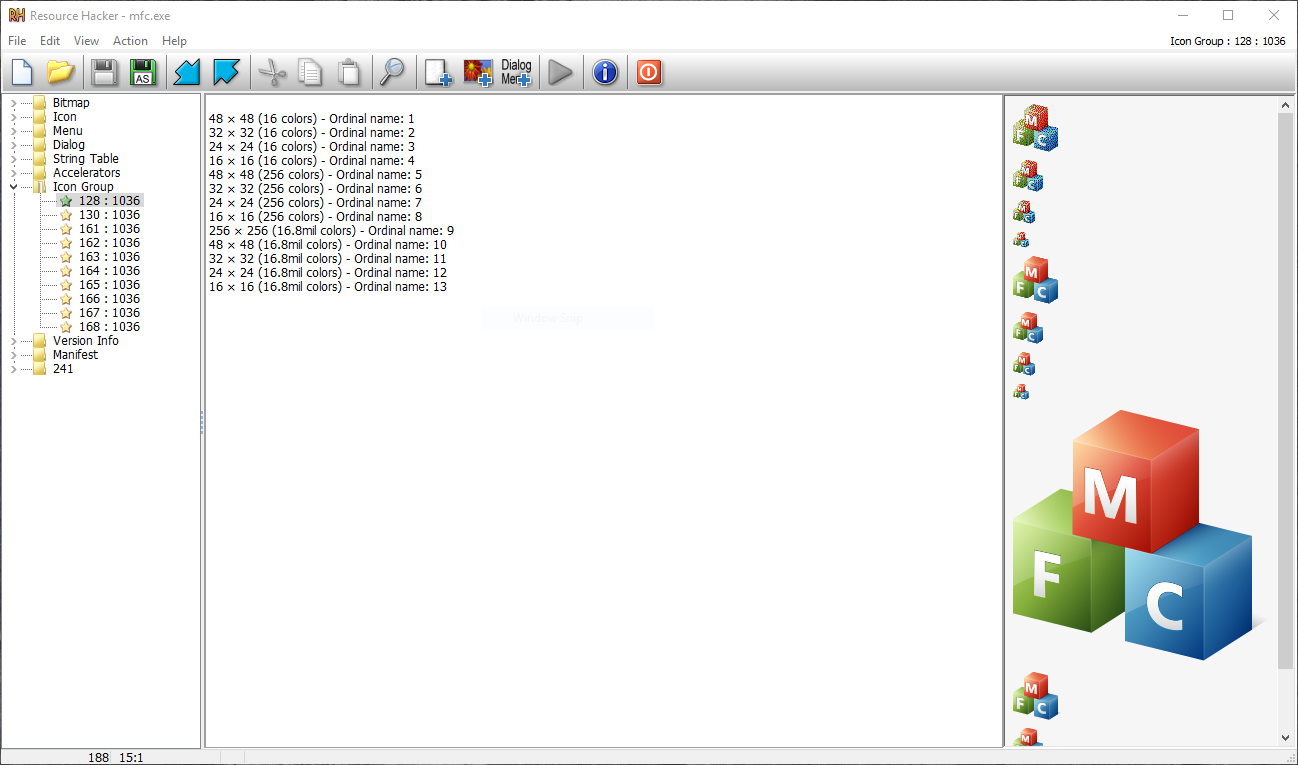
After the switch: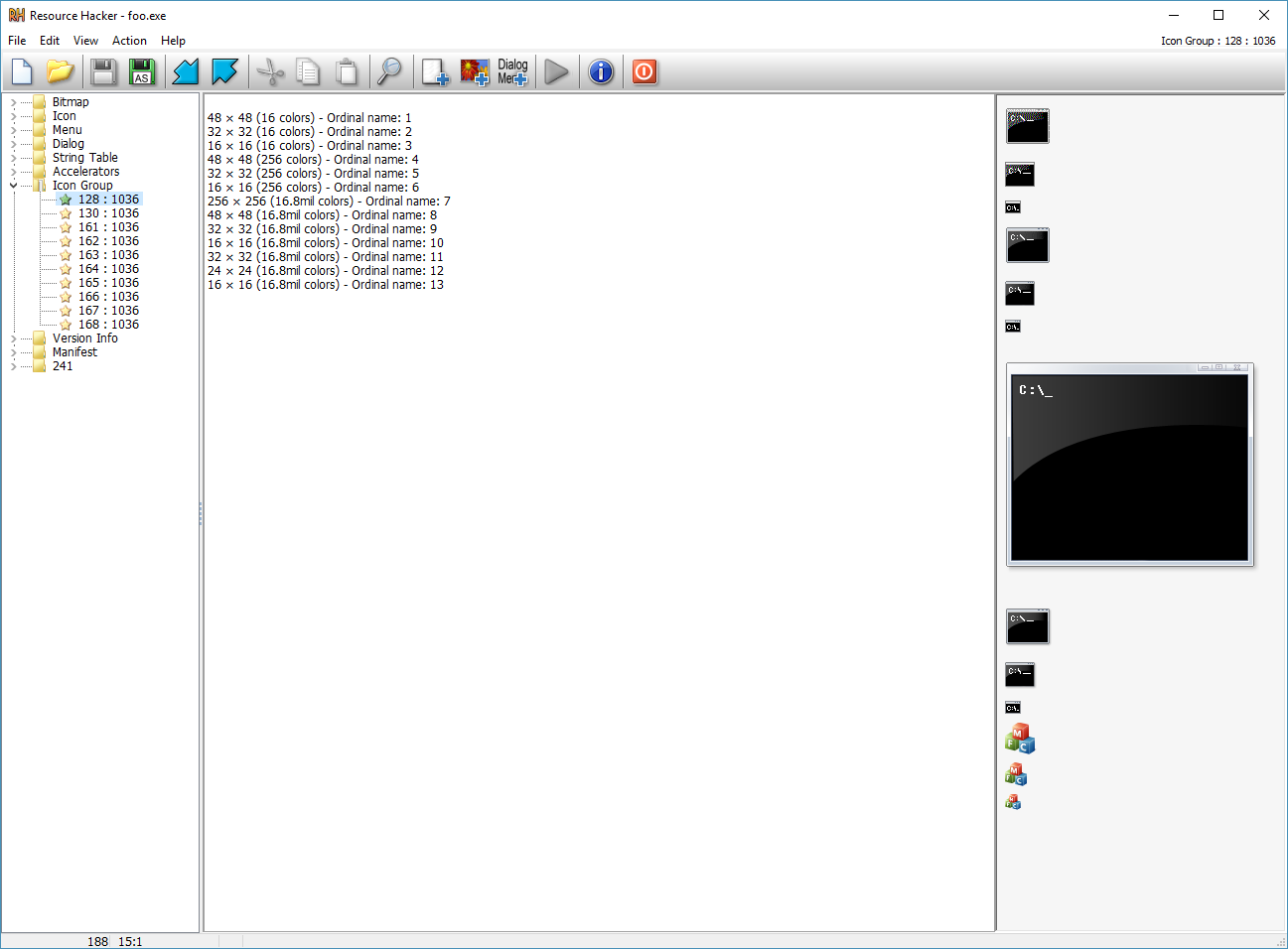
References