

10 - Android formats
This tutorial introduces Android formats and the API for using them. This includes DEX, OAT, VDEX, and ART.
Introduction
Let’s start with a quick overview of the compilation, installation, and execution of Android applications.
When developing applications, the main part of the code is usually written in Java. Developers can also write native code (C/C++) through the Java Native Interface (JNI).
In the APK building process, Java code is eventually transformed into Dalvik bytecode, which is interpreted by the Android Java virtual machine. The Android JVM differs from Oracle’s implementation; among other differences, it is register-based, whereas Oracle’s implementation is stack-based.
To produce Dalvik bytecode, Java sources are first compiled with javac into Java bytecode, which Android then transforms into Dalvik bytecode using the dx compiler (or the newer D8). This bytecode is finally wrapped in DEX files, such as classes.dex. The DEX format is specific to Android, and its documentation is available here.
During APK installation, the system applies optimizations to the DEX file to speed up execution. Interpreting bytecode is not as efficient as executing native code, and the Dalvik virtual machine is based on 32-bit registers, whereas most recent CPUs are 64-bit.
To address this issue, and prior to Android 4.4 (KitKat), the runtime used JIT compilation to transform Dalvik bytecode into assembly. JIT occurred during execution each time the application was run. Since Android 4.4, Android has used a new runtime that performs optimizations during installation. Consequently, installation takes more time, but the transformation to native code is performed only once.
To optimize Dalvik bytecode, the original DEX file (e.g., classes.dex) is transformed into another file containing the native code. This new file typically has the .odex or .oat extension and is wrapped in the ELF format. Using the ELF format makes sense for two main reasons:
It is the default format used by Linux and Android to package assembly code.
It enables the use of the same loader:
/system/bin/linker{64}.
OAT files are actually ELF files, which is why we chose to add support for this format in LIEF. The ELF format acts as a wrapper around the Android-specific OAT format.
Basically, the associated ELF exports a few symbols:
oat = lief.OAT.parse("SomeOAT")
assert oat is not None
for s in oat.dynamic_symbols:
    print(s)
oatdata                       OBJECT    GLOBAL    1000      1262000
oatexec                       OBJECT    GLOBAL    1263000   10d4060
oatlastword                   OBJECT    GLOBAL    233705c   4
oatbss                        OBJECT    GLOBAL    2338000   f5050
oatbsslastword                OBJECT    GLOBAL    242d04c   4
These symbols serve as pointers to specific parts of the OAT format. For example, oatdata points to the beginning of the underlying OAT format, while oatexec points to the native code. For a deeper understanding of OAT internal structures, see:
These different formats can be a bit confusing. To summarize:
DEX files are transformed into .odex files, which are primarily ELF files wrapping a custom OAT format.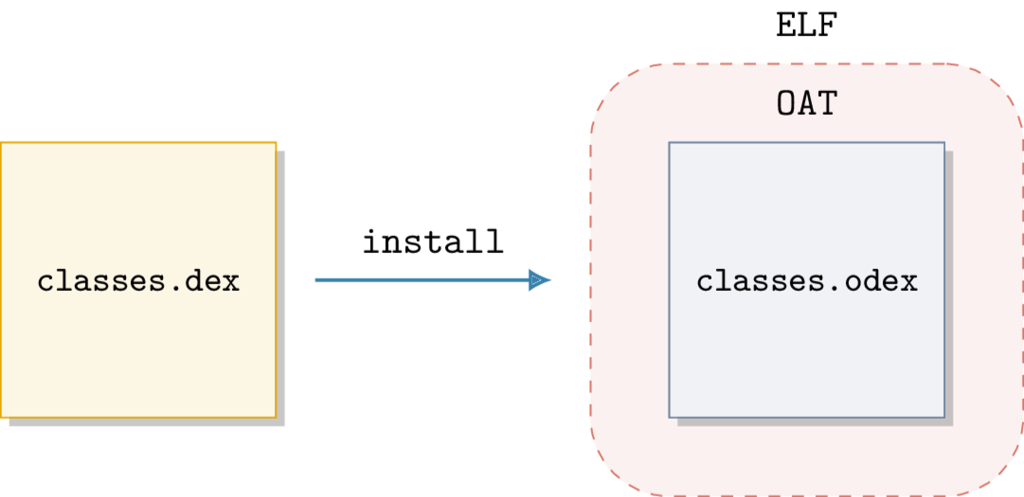
OAT structure is poorly documented, and its internal structures change with each version of Android without backward compatibility. This means OAT files produced on Android 6.0.1 can only be used on that version.
In the Android framework, the dex2oat executable is responsible for converting and optimizing APK DEX files into OATs. This executable is located in the /system/bin/ directory, and its output can be viewed via logcat:
$ adb logcat -s "dex2oat:I"
...
05-04 10:16:37.218  1987  1987 I dex2oat : /system/bin/dex2oat --compiler-filter=speed --dex-file=/data/user/0/com.google.android.gms/snet/installed/snet.jar --oat-file=/data/user/0/com.google.android.gms/snet/dalvik-cache/snet.dex
05-04 10:16:37.688  1987  1998 W dex2oat : Compilation of void com.google.android.snet.Snet.enterSnetIdle(android.content.Context, android.os.Bundle) took 116.995ms
05-04 10:16:37.768  1987  1987 I dex2oat : ----------------------------------------------------
05-04 10:16:37.768  1987  1987 I dex2oat : <SS>: S T A R T I N G . . .
05-04 10:16:37.768  1987  1987 E dex2oat : <SS>: oat location is not valid /data/user/0/com.google.android.gms/snet/dalvik-cache/snet.dex
05-04 10:16:37.768  1987  1987 I dex2oat : dex2oat took 552.045ms (threads: 8) arena alloc=3MB java alloc=1150KB native alloc=8MB free=3MB
05-04 12:25:50.878 10460 10460 I dex2oat : /system/bin/dex2oat --compiler-filter=speed
...
The output above shows the transformation of SafetyNet DEX files, located in /data/user/0/com.google.android.gms/snet/installed/snet.jar, into an OAT saved in /data/user/0/com.google.android.gms/snet/dalvik-cache/snet.dex.
One can see that the extension is .dex, which suggests a DEX file rather than an OAT. However, checking the file type reveals:
$ file snet.dex
snet.dex: ELF 64-bit LSB shared object, ARM aarch64, version 1 (GNU/Linux), dynamically linked, stripped
It is an ELF file.
Warning
Do not trust extensions: .dex can be DEX or OAT, .odex files are OAT, .oat files are OAT, etc.
The process of converting Java sources into OAT can be simplified with the following diagram: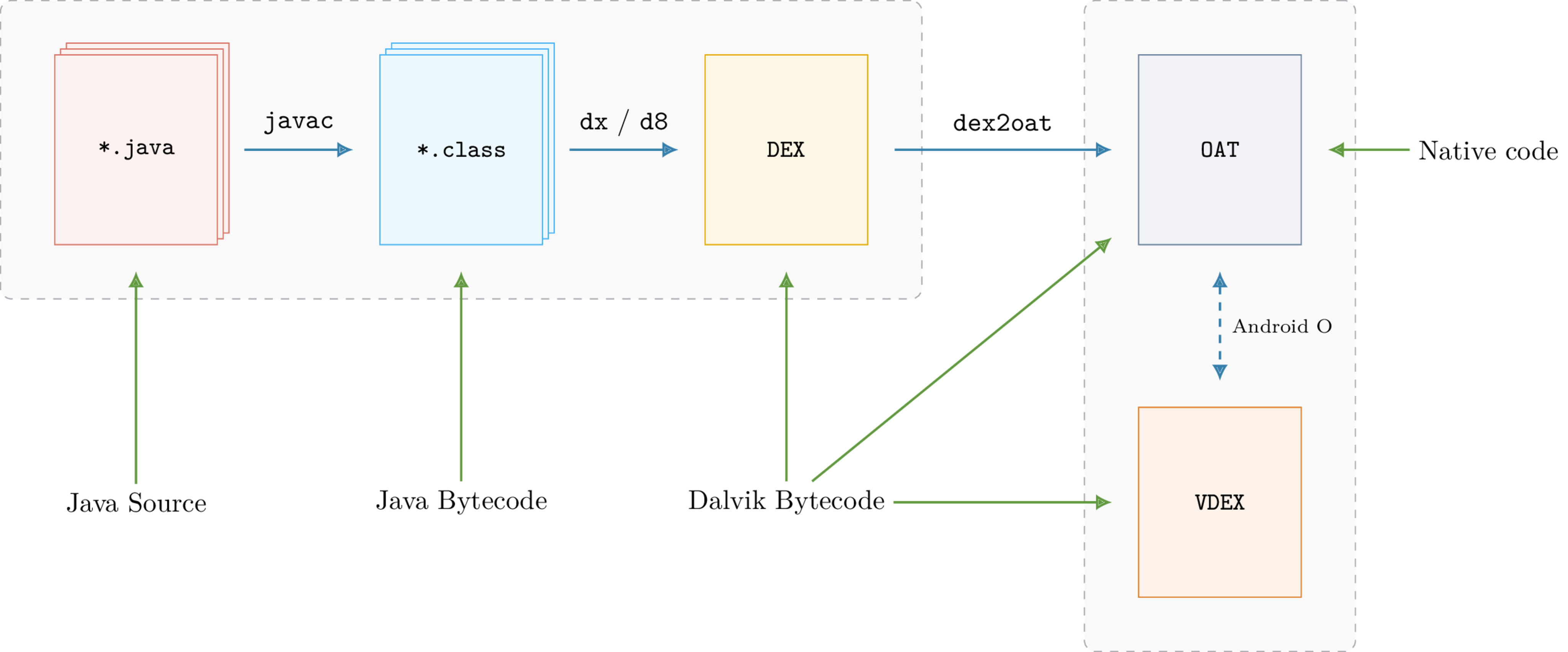
The Missing DEX
When analyzing applications from the Google Play Store, the APK usually contains classes.dex files. Since these files contain the Dalvik bytecode, most tools rely on them for analysis (decompilation, static analysis, etc.).
However, when analyzing manufacturer firmware (or ROMs), these DEX files might be missing. For example, the Samsung com.android.settings application is associated with the /system/priv-app/SecSettings2 directory, which has the following structure:
$ tree system/priv-app/SecSettings2

├── oat
│   └── arm64
│       └── SecSettings2.odex
└── SecSettings2.apk

2 directories, 2 files
The SecSettings2.apk file does not contain any .dex files:
$ unzip -l ./SecSettings2.apk|grep -c "classes.dex"
0
Next to SecSettings2.apk is SecSettings2.odex, which is the OAT file resulting from the optimization of the missing DEX file. Since ROM developers control the Android version and target architecture, they only need to provide the OAT file.
This “feature” can also be used to hinder analysis and reverse engineering. Since the Dalvik bytecode resides in the DEX file, analysis is quite limited without it.
Fortunately, a copy of the original DEX is included within the OAT! While it is not an exact copy (as dex2oat replaces some Dalvik instructions, such as invoke-virtual, with optimized ones [1]), starting with Android N, the original instructions can also be recovered.
Prior to Android Oreo (8.0.0), DEX files were embedded in the OAT itself. After Oreo, the transformation performed by dex2oat generates two files:
classes.odex: OAT containing native code
classes.vdex: VDEX file containing a copy of the original DEX files
The DEX files originally located in the OAT have been exported to a new file with a new format: VDEX. This format is completely different from OAT; specifically, it is not an ELF file.
Similar to the OAT format, VDEX internal structures change with each version of Android without backward compatibility.
There also exist tools [4] [5] [6] to extract DEX files from OAT/VDEX files, but extraction [3] is either limited to OAT [4] or VDEX [5]. LIEF aims to provide a single framework for dealing with these formats.
OAT and VDEX
As explained previously, the internal structures of these formats change with each version of Android. LIEF provides an abstraction of these modifications, allowing users to work with OAT or VDEX without worrying about the underlying version.
LIEF currently supports OAT files from Android 6.0 Marshmallow (OAT v64) to Android 8.0.1 Oreo (OAT v131).
The OAT version can be obtained using the lief.OAT.version() function:
>>> import lief
>>> lief.OAT.version("classes.odex") # From Android 6
64
>>> lief.OAT.version("classes.odex") # From Android 7
88
The associated Android version can be accessed using lief.OAT.android_version():
>>> lief.OAT.android_version(64)
ANDROID_VERSIONS.VERSION_601
>>> lief.OAT.android_version(124)
ANDROID_VERSIONS.VERSION_800
>>> lief.Android.code_name(lief.Android.ANDROID_VERSIONS.VERSION_800)
'Oreo'
>>> lief.Android.version_string(lief.Android.ANDROID_VERSIONS.VERSION_800)
"8.0.0"
lief.OAT.Binary class extends :>>> import lief
>>> oat = lief.OAT.parse("classes.odex")
>>> type(oat)
_pylief.OAT.Binary
>>> isinstance(oat, lief.ELF.Binary)
True
Thus, the same ELF API is available (adding sections, modifying dynamic entries, etc.), and the lief.OAT.Binary object adds the following methods:
- class lief.OAT.Binary
Bases:
BinaryOAT binary representation
- property classes lief.OAT.Binary.it_classes
Return an iterator over
Class
- property dex2dex_json_info str
- property dex_files lief.OAT.Binary.it_dex_files
Return an iterator over
File
- get_class(self, class_name: str) lief._lief.OAT.Class | None
- get_class(self, class_index: int) lief._lief.OAT.Class | None
Overloaded function.
get_class(self, class_name: str) -> lief._lief.OAT.Class | None
Return the
Classfrom its nameget_class(self, class_index: int) -> lief._lief.OAT.Class | None
Return the
Classfrom its index
- has_class(self, arg: str, /) bool
Check if the class with the given name is present in the current OAT binary
- property header lief.OAT.Header
Return the OAT
Header
- property methods lief.OAT.Binary.it_methods
Return an iterator over
Method
- property oat_dex_files lief.OAT.Binary.it_oat_dex_files
Return an iterator over
DexFile
If the OAT targets Android Marshmallow or Nougat (6 or 7), DEX files can be retrieved via the lief.OAT.Binary.dex_files attribute:
oat: lief.OAT.Binary

dex = oat.dex_files[0]
dex.save("/tmp/classes.dex")
In the code above, the lief.DEX.File has been extracted to /tmp/classes.dex (with de-optimization).
If the OAT targets Android Oreo or above, extraction uses the VDEX file. The lief.OAT.parse() function accepts an OAT file, or both an OAT and a VDEX file. Providing the VDEX file allows the lief.OAT.Binary object to offer the same functionality as it does for pre-Oreo OAT files.
If the VDEX file is not provided, the lief.OAT.Binary will have limited information:
# Without VDEX file
>>> oat_oreo = lief.OAT.parse("KeyChain.odex")
>>> len(oat_oreo.dex_files)
0
>>> len(oat_oreo.classes)
0
>>> len(oat_oreo.oat_dex_files)
1
>>> oat_dex_file = oat_oreo.oat_dex_files[0]
>>> print(oat_dex_file)
/system/app/KeyChain/KeyChain.apk - (Checksum: 0x206c8ab1)
# With VDEX file
>>> oat_oreo = lief.OAT.parse("KeyChain.odex", "KeyChain.vdex")
>>> len(oat_oreo.dex_files)
1
>>> len(oat_oreo.classes)
17
>>> oat_oreo.dex_files[0].save("/tmp/classes.dex")
The LIEF VDEX module can also be used directly:
>>> vdex = lief.VDEX.parse("KeyChain.vdex")
Because the VDEX format is completely different from OAT, ELF, PE, and Mach-O, the VDEX parser creates a lief.VDEX.File object rather than a Binary. DEX files can be extracted using the lief.VDEX.File.dex_files attribute:
>>> len(vdex.dex_files)
1
>>> vdex.dex_files[0].save("/tmp/KeyChain.dex") # With de-optimization
DEX
The previous section covered the OAT and VDEX formats and how to access the underlying DEX. This section introduces the primary API for the lief.DEX.File object.
The LIEF DEX module allows you to obtain information about Java code, such as strings, class names, Dalvik bytecode, etc.
Note
Since the LIEF project focuses solely on formats, the DEX module does not include a Dalvik disassembler.
The primary API for a DEX file is in the lief.DEX.File object. This object can be generated using:
>>> oat = lief.OAT.parse("SecSettings2.odex")
>>> type(oat.dex_files[0])
_pylief.DEX.File

>>> vdex = lief.VDEX.parse("SecSettings2.odex")
>>> type(vdex.dex_files[0])
_pylief.DEX.File

>>> dex = lief.DEX.parse("classes.dex")
>>> type(dex)
_pylief.DEX.File
Once created, strings can be accessed via the lief.DEX.File.strings attribute:
dex: lief.DEX.File

for s in dex.strings:
    if "http" in s:
        print(s)
https://analytics.mopub.com/i/jot/exchange_client_event
https://app-measurement.com/a
https://mobilecrashreporting.googleapis.com/v1/crashes:batchCreate?key=
https://pagead2.googlesyndication.com/pagead/gen_204?id=gmob-apps
https://plus.google.com/
https://ssl.google-analytics.com
https://support.google.com/dfp_premium/answer/7160685#push
https://www.google.com
...
Similarly, methods and classes are available via the lief.DEX.File.classes and lief.DEX.File.methods attributes:
dex: lief.DEX.File

for cls in dex.classes:
    if cls.source_filename:
        print(cls)
com.avast.android.sdk.antitheft.internal.protection.wipe.a - CalendarWiper.java - 3 Methods
com.avast.android.account.internal.identity.a - AvastIdentityProvider.java - 17 Methods
com.avast.android.account.internal.identity.d - FacebookIdentityProvider.java - 19 Methods
com.avast.android.lib.wifiscanner.internal.b$a - WifiScannerComponentFactory.java - 1 Methods
In the DEX file format, a special attribute for classes records the original source filename: source_file_idx. Some obfuscators mangle class names but preserve this attribute! Since Java source filenames are associated with class names, the deobfuscated name can often be recovered using:
dex: lief.DEX.File

for cls in dex.classes:
    if cls.source_filename:
        print(cls.pretty_name + ": ---> " + cls.source_filename)
com.avast.android.sdk.antitheft.internal.protection.wipe.a: ---> CalendarWiper.java
com.avast.android.account.internal.identity.a               ---> AvastIdentityProvider.java
com.avast.android.account.internal.identity.d               ---> FacebookIdentityProvider.java
com.avast.android.lib.wifiscanner.internal.b$a              ---> WifiScannerComponentFactory.java


DEX methods are represented by the :class:`~lief.DEX.Method` object, and raw
Dalvik bytecode can be accessed via :attr:`lief.DEX.Method.bytecode`.
ART
ART is the name of the Android Runtime, but it is also a format! This format is used for optimization by the Android framework.
As discussed previously, Android has its own implementation of the Java virtual machine based on Dalvik bytecode. This JVM is implemented in C++, and Java primitives (java.lang.String, java.lang.Object, etc.) are mirrored with C++ objects:
java.lang.Class:art::mirror::Classjava.lang.String:art::mirror::Stringjava.lang.reflect.Method:art::mirror::Method…
When a new Java class is instantiated, a mirrored C++ object is created (memory allocation, constructor calls, etc.), and the JVM maintains a reference to this C++ object. To speed up the boot process and avoid re-instantiating well-known classes [2] at each boot, Android uses the ART format to store instances of C++ objects. It can be thought of as a heap dump of C++ objects.
As with OAT and VDEX, the internal structures of this format change with each version of Android.
LIEF 0.9 provides basic support for this format and exposes the ART lief.ART.Header. The primary API is available in the lief.ART.File object.
art = lief.ART.parse("boot.art")
assert isinstance(art, lief.ART.File)

print(art.header)
Version:                         46
Image Begin:                     0x70000000
Image Size:                      0x238ac8
Checksum:                        0x997c0fb0
OAT File Begin:                  0x70a5b000
OAT File End:                    0x71272000
OAT Data Begin:                  0x70a5c000
OAT Data End:                    0x7126df70
Patch Delta:                     0
Pointer Size:                    8
Compile pic:                     true
Number of sections:              10
Number of methods:               7
Boot Image Begin:                0
Boot Image Size:                 0
Boot OAT Begin:                  0
Boot OAT Size:                   0
Storage Mode:                    UNCOMPRESSED
Data Size:                       0x2389f0
Conclusion
LIEF 0.9 provides read-only access to these formats, but future versions should allow for modification (adding methods, changing names, patching checksums, etc.).
Enjoy!
Notes
API