

08 - Transforming an ELF executable into a library
In this tutorial, we will see how to convert a PIE executable into a library.
Introduction
Examining the header of an ELF PIE executable reveals that it has the same type as a shared object (i.e., a library):
$ readelf -h /usr/bin/ssh|grep Type
Type:  DYN (Shared object file)

$ readelf -h /usr/lib/libm.so|grep Type
Type:  DYN (Shared object file)
Using LIEF, we can access this information through the file_type attribute:
>>> libm = lief.parse("/usr/lib/libm.so.6")
>>> print(libm.header.file_type)
FILE_TYPE.DYN

>>> ssh = lief.parse("/usr/bin/ssh")
>>> print(ssh.header.file_type)
FILE_TYPE.DYN
The main difference between PIE binaries and shared libraries is how symbols are exported.
A shared library is designed to expose functions so that executables can bind to it, whereas executables should not expose functions [1].
This is confirmed by the number of exported functions in the two different objects:
>>> print(len(libm.exported_functions))
572
>>> print(len(ssh.exported_functions))
10
In this tutorial, we will see how to transform raw function addresses into exported functions associated with a symbol, thus exposing internal functions of the executable.
Exporting functions
Such a transformation can be useful if we find a function at a given address and want to instrument it (using dlopen/dlsym, for example). Once the target function is exported, we can link it as we would for a normal library.
For example, in a fuzzing scenario, if one identifies a parser function, we can export it and then feed its inputs using AFL. This allows us to bypass the normal entry point to reach the function directly.
Let’s see how it works on a basic crackme:
#include <stdlib.h>
#include <stdio.h>
#include <string.h>

#define NOINLINE __attribute__ ((noinline))

NOINLINE int check_found(char* input) {
  if (strcmp(input, "easy") == 0) {
    return 1;
  }
  return 0;
}

int main(int argc, char** argv) {

  if (argc != 2) {
    printf("Usage: %s flag\n", argv[0]);
    return -1;
  }

  if (check_found(argv[1])) {
    printf("Well done!\n");
  } else {
    printf("Wrong!\n");
  }
  return 0;
}
This code takes a string as input and calls the check_found function on this string. It returns 1 if the input is easy, and 0 otherwise.
The __attribute__ ((noinline)) is used to ensure the check_found function is not inlined by the compiler. If the function is inlined, there will be no address associated with it.
The following figure summarizes the execution flow: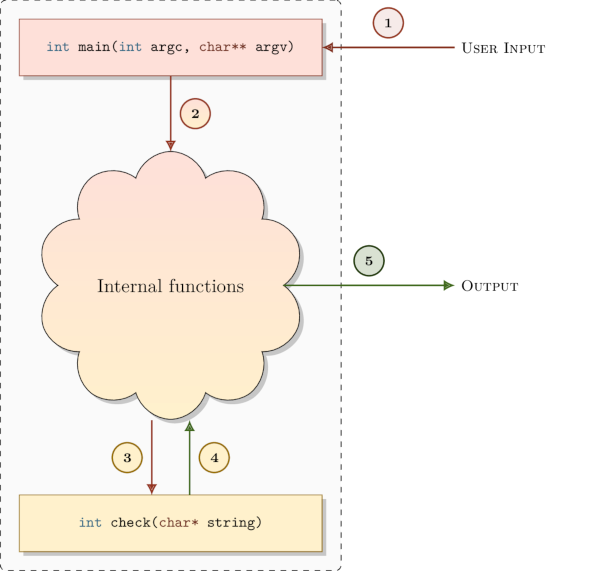
The crackme can be compiled with:
$ gcc crackme101.c -O0 -fPIE -pie -Wl,-strip-all,--hash-style=sysv -o crackme101.bin -fvisibility=hidden
$ ./crackme101.bin foo
Wrong!
$ ./crackme101.bin easy
Well done!
Note the use of the -fvisibility=hidden flag. It prevents the compiler from automatically exporting functions, such as check_found. Opening crackme101.bin with LIEF confirms that no functions are exported:
>>> import lief
>>> crackme101 = lief.parse("./crackme101.bin")
>>> print(len(crackme101.exported_functions))
0
Using a disassembler, we can quickly identify the address of the check function: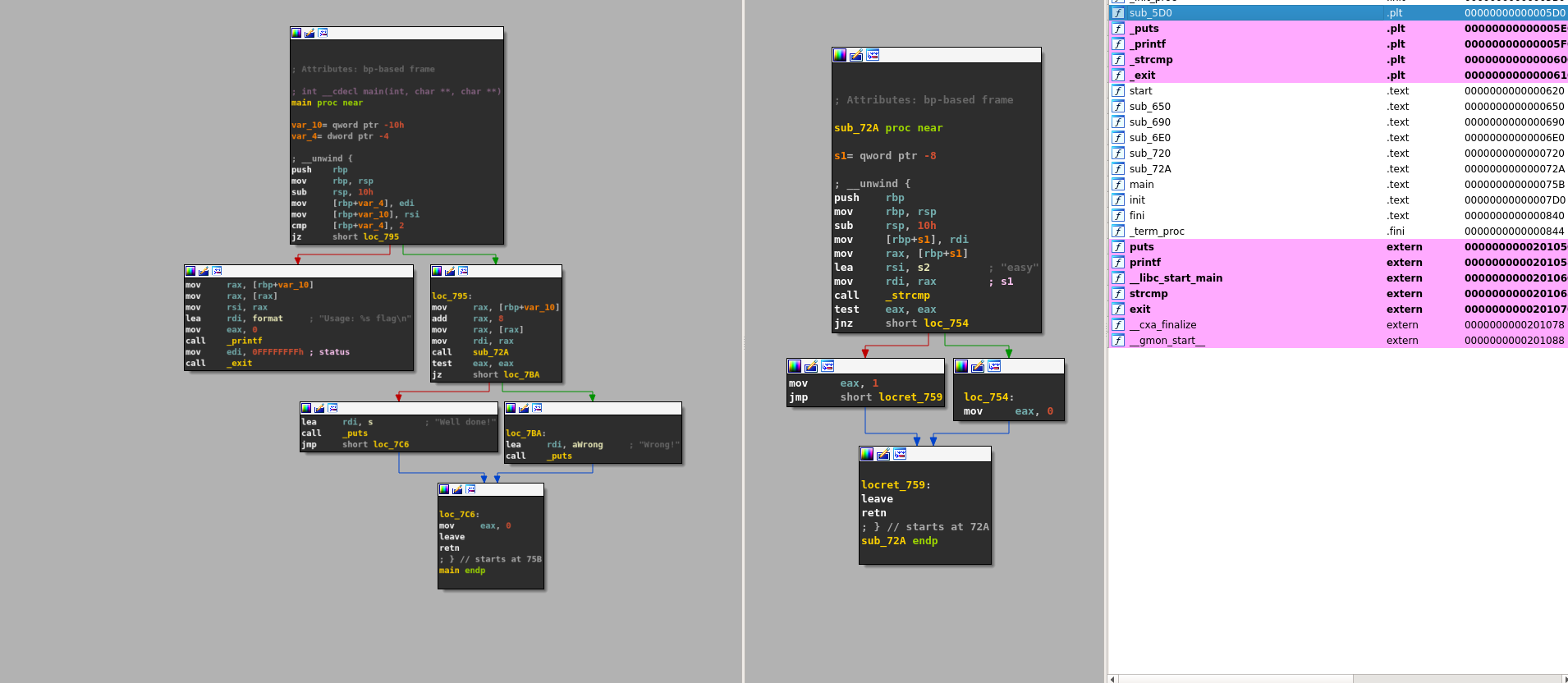
In this case, the check function is located at address: 0x72A [2].
Now that we have identified the address, we can export it as a named function: check_found.
crackme101: lief.ELF.Binary

addr = crackme101.get_function_address("check_found")  # 0x72A
assert isinstance(addr, int)
crackme101.add_exported_function(addr, "check_found")
crackme101.write("libcrackme101.so")
And that’s all!
libcrackme101.so is now a library that exports one function: check_found.
>>> import lief
>>> libcrackme101 = lief.parse("./libcrackme101.so")
>>> print(len(libcrackme101.exported_functions))
1
>>> print(libcrackme101.exported_functions[0])
check_found
Notably, libcrackme101.so remains an executable:
$ ./libcrackme101.so foo
Wrong!
$ ./libcrackme101.so easy
Well done!
Since we have exported a function, we can now use dlopen on libcrackme101.so and dlsym on check_found:
#include <dlfcn.h>
#include <stdio.h>
#include <stdlib.h>

typedef int(*check_t)(char*);

int main (int argc, char** argv) {

  void* handler = dlopen("./libcrackme101.so", RTLD_LAZY);
  if (!handler) {
    fprintf(stderr, "dlopen error: %s\n", dlerror());
    return 1;
  }
  check_t check_found = (check_t)dlsym(handler, "check_found");

  int output = check_found(argv[1]);

  printf("Output of check_found('%s'): %d\n", argv[1], output);

  return 0;
}
Running the code above should yield a similar output:
$ gcc instrument.c -O0 -fPIE -pie -o instrument.bin -ldl
$ ./instrument.bin test
Output of check_found('test'): 0
$ ./instrument.bin easy
Output of check_found('easy'): 1
If dlopen returns an error, please read the following section about glibc >= 2.29.
The transformation of the execution flow can be represented as follows: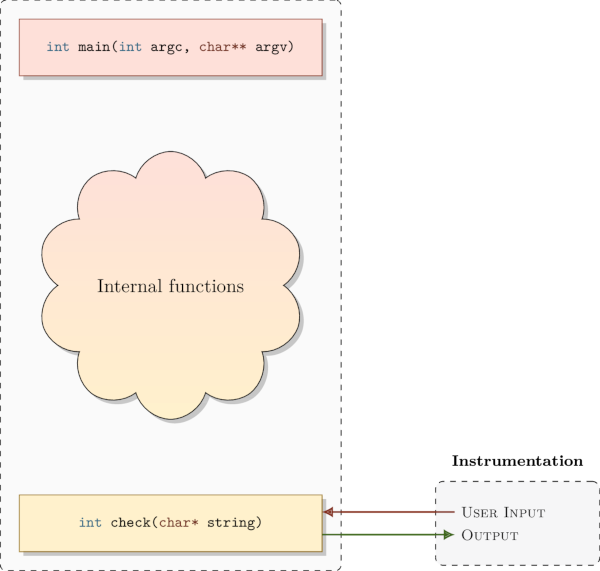
Warning for glibc >= 2.29 users
If you are using glibc >= 2.29 (or a similar version depending on your Linux distribution), you might have encountered this error while using the dlopen function:
dlopen error: cannot dynamically load position-independent executable
Loading PIE binaries as shared libraries was not really an intended use case for dlopen, and it used to work without being properly supported. One reason is that it does not seem trivial to support all possible use cases (issues with certain relocations and ELF constructors).
These glibc versions now implement a check to deny dlopen calls with PIE binaries. This is done by verifying that the DF_1_PIE flag is not present in the dynamic information flags.
To circumvent this check, LIEF can be used to remove the DF_1_PIE flag:
import lief
path = sys.argv[1]
bin_ = lief.parse(path)
assert isinstance(bin_, lief.ELF.Binary)
bin_[lief.ELF.DynamicEntry.TAG.FLAGS_1].remove(lief.ELF.DynamicEntryFlags.FLAG.PIE)
bin_.write(path + ".patched")
Conclusion
Because PIE executables are designed to be mapped at a random base address, they generally behave like a library. We only need to export the relevant functions.
For non-PIE executables, such a transformation would be very difficult because it requires first transforming the executable into a relocatable executable. This involves creating relocations, patching absolute jumps, etc.
LIEF currently only supports this transformation for ELF, and we need to investigate the PE and Mach-O cases [3].
Notes